Выбрать организацию
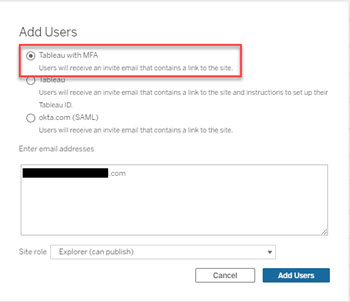
Online Invitation Emails May Not Being Sent to Users Set to Tableau with MFA
Дата публикации: Feb 25, 2025
Описание
Cause
This is a known issue that is fixed in the current version of Tableau Cloud.Решение
Option 1
Add the user with the Tableau authentication type. Then switch their auth type to Tableau with MFA. See Set the User Authentication Type for more information.Option 2
Go to https://id.tableau.com/register and create a Tableau account with the same email address. An email will be sent to the users email with a link to activate the account*. If the account is successfully activated, the user can go to https://online.tableau.com to login.*If the Tableau ID account already exists, an email will be sent to reset the password.
Дополнительные ресурсы
For more information, see:
Номер статьи базы знаний
001474702
Эта статья решила вашу проблему?
Оставьте свой отзыв, чтобы мы могли стать лучше!
