Välj en organisation
When Connecting to Google Big Query from Tableau Desktop, the Target Project is not Displayed
Publiceringsdatum: Apr 29, 2025
Beskrivning
Cause
Service account permissions have not been granted to the target project.Lösning
You can add members on Google Cloud by doing the following.
1. Access Google Cloud
2. Select the project.
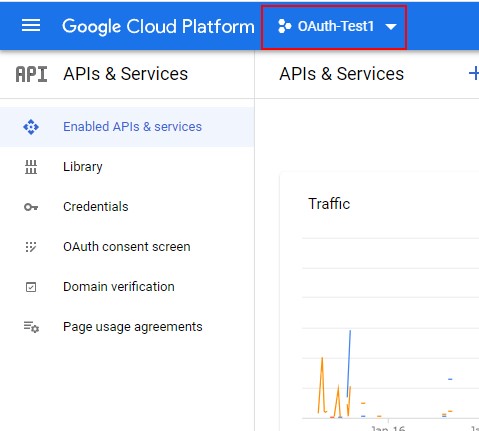
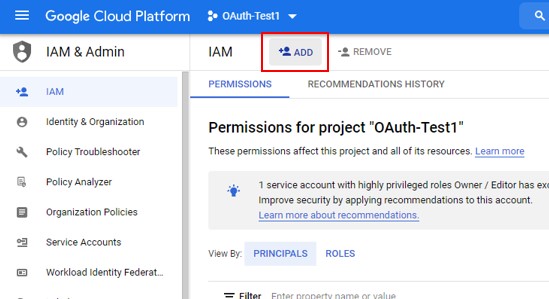
3. Click Menu > I AM & Admin.
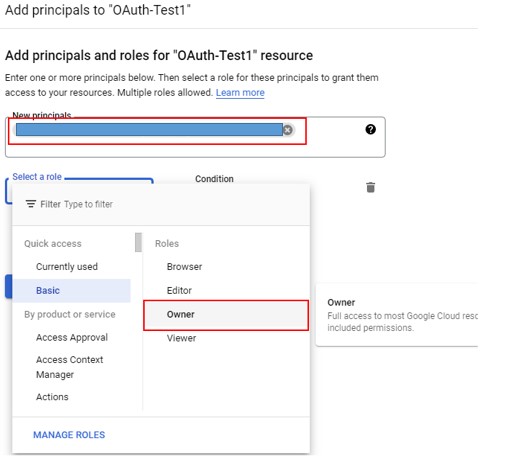
4. Click ADD and add the target service account.
Knowledge-artikelnummer
001474756
Löste denna artikel ditt problem?
Berätta för oss vad vi kan förbättra!
