Velg en organisasjon
When Connecting to Azure SQL Server Using Extract Text is Unexpectedly Truncated
Publiseringsdato: Feb 19, 2026
Beskrivelse
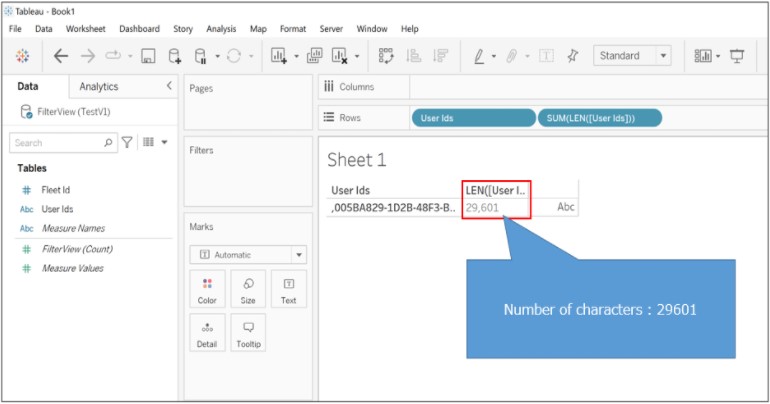
Originally : 29601 character
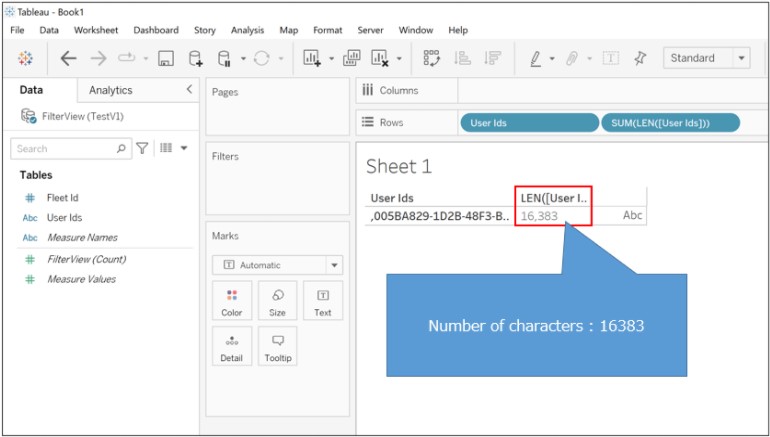
Truncated : 16383 character
When connecting to DB with Live.
When connecting to DB with Extract.
Cause
By design, memory limit has been reached.Løsning
-----------------------------------------------
<?xml version='1.0' encoding='utf-8' ?>
<connection-customization class='azure_sqldb' enabled='true' version='10.5'>
<vendor name='azure_sqldb' />
<driver name='azure_sqldb' />
<customizations>
<customization name='CAP_ODBC_BIND_FORCE_MAX_STRING_BUFFERS' value='yes' />
</customizations>
</connection-customization>
----------------------------------------------
2. Store the tdc file in the following folder.
C:\Users\<user_name>\Documents\My Tableau Repository\Datasources
3. Restart tableau desktop and connect to the data source with the extract.
Knowledge-artikkelnummer
001474815
Hjalp denne artikkelen med å løse problemet ditt?
La oss få vite det slik at vi kan forbedre!
