Välj en organisation
Command Line Repository folder does not change location after the [My Tableau Prep Repository] location is changed
Publiceringsdatum: Apr 13, 2024
Beskrivning
Unable to change the log folder location for Tableau Prep CLI.
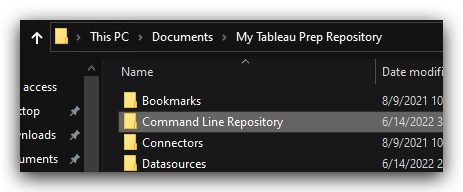
Even if you change the repository location for Tableau Prep, the command line log folder stays in [C:\Users\<UserName>\Documents\My Tableau Prep Repository].
The issue is only for the [Command Line Repository] folder. All other folders from "My Tableau Prep Repository" are moved when User selects a new location from Prep builder File-> Repository Location menu except the [Command Line Repository] folder.
Please check the below image for the [Command Line Repository] folder.
Cause
This issue has been fixed in W-14166818 in the Tableau Prep 2024.1Lösning
Option 1
Please use Tableau Prep Builder 2024.1 or later versions.
If you are using a version former than Tableau Prep 2024.1, please consider the below workarounds.
Option 2
Delete the log files manually in the [Command Line Repository] folder.Can We Delete Tableau Desktop Or Tableau Prep Logs Folder?
Option 3
If the log size is increasing and causing disk shortage, you can suppress the creation of the log files below.Suppress "log _*.txt" file in Tableau Prep Builder and CLI.
Create a "no-logs" (no extension) file in the directory as follow
Prep Builder
C:\Program Files\Tableau\Tableau Prep Builder 2021.1
Prep CLI
C:\Program Files\Tableau\Tableau Prep Builder <version>\resources\app\
Note: When the file "no-logs" is found, Tableau Prep will not create "log _*.txt" file, not all the log files.
Knowledge-artikelnummer
001475115
Löste denna artikel ditt problem?
Berätta för oss vad vi kan förbättra!
