組織を選択
'Edit Data Source' Unavailable for Google BigQuery Data Sources
公開日: Apr 13, 2024
説明
The 'Edit Data Source' option may be grayed out for some published data sources. Additionally the information displayed says "Connection not supported by web authoring. Use Tableau Desktop to edit data source."

Cause
Editing data sources on the web does not support OAuth data sources that use 'managed keychains' for authentication. The "embedded password" option in the publishing dialog in Tableau Desktop corresponds to 'managed keychain', while the 'Embed <Google BigQuery email>' option corresponds to 'saved credentials'.
For more information, see:
Note: Another possible reason for the 'Edit Data Source' option being unavailable for a data source is that the data source uses a connection facilitated by Tableau Bridge.
解決策
Option 1
When publishing the data source using Tableau Desktop, select either the 'Prompt user' or 'Embed <Google BigQuery email>' option under Authentication is selected.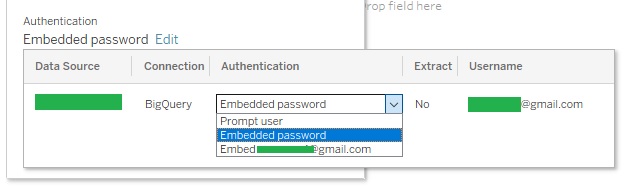
Option 2
Create the data source using web authoring.ナレッジ記事番号
001475346
この記事で問題は解決されましたか?
ご意見をお待ちしております。
