조직 선택
'Edit Data Source' Unavailable for Google BigQuery Data Sources
게시 일자: Apr 13, 2024
상세 설명
The 'Edit Data Source' option may be grayed out for some published data sources. Additionally the information displayed says "Connection not supported by web authoring. Use Tableau Desktop to edit data source."

Cause
Editing data sources on the web does not support OAuth data sources that use 'managed keychains' for authentication. The "embedded password" option in the publishing dialog in Tableau Desktop corresponds to 'managed keychain', while the 'Embed <Google BigQuery email>' option corresponds to 'saved credentials'.
For more information, see:
Note: Another possible reason for the 'Edit Data Source' option being unavailable for a data source is that the data source uses a connection facilitated by Tableau Bridge.
솔루션
Option 1
When publishing the data source using Tableau Desktop, select either the 'Prompt user' or 'Embed <Google BigQuery email>' option under Authentication is selected.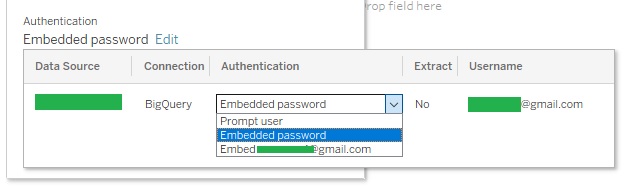
Option 2
Create the data source using web authoring.Knowledge 기사 번호
001475346
이 기사를 통해 문제를 해결했습니까?
개선을 위한 의견을 보내주세요.
