Välj en organisation
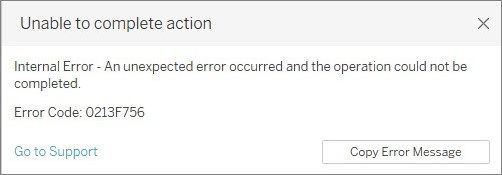
Error code: 0213F756 Unable to retrieve data from Google Analytics 4 via proxy on Windows
Publiceringsdatum: Mar 23, 2026
Beskrivning
When connected to Google Analytics 4 from Tableau installed on Windows OS, the Google Analytics 4 connector works correctly until selecting a Date range, a Dimension, or other similar functions, but after selecting 'Connect', the loading screen will hang or the following error message appears:
Internal Error - An unexpected error occurred and the operation could not be completed.
Error Code:0213F756
Cause
Retrieving data from Google Analytics 4 via a proxy is not possible before 2023.3.0.
Lösning
Windows only
For Tableau Desktop 2023.3.0 or newer
- Install Tableau Desktop 2023.3.0 or newer.
- Click the Windows Start button and type in: env
- From the search results, select 'Edit the system environment variables'.
- In the System Properties dialog, click 'Environment Variables'.
- In the Environment Variables dialog, under User variables, configure the following as required (If more than one value is specified, values should be separated by commas):
- http_proxy
- https_proxy
- no_proxy *no_proxy should include the following: localhost,127.0.0.1,[::1]
- Click OK to close the dialogs.
For Tableau Desktop 2023.2 or older
- Use in an environment that does not require a proxy.
- Configure the network to allow direct access to analyticsdata.googleapis.com.
*For more information about analyticsdata.googleapis.com see Google Analytics Data API.
Ytterligare resurser
Tableau Community - GA4 Connection in Mac
Knowledge-artikelnummer
001475419
Löste denna artikel ditt problem?
Berätta för oss vad vi kan förbättra!
