Välj en organisation
String Fields with More Than 255 Characters Are Truncated When Connecting to Databricks in Tableau Desktop
Publiceringsdatum: Dec 26, 2025
Beskrivning
When connecting to Databricks from Tableau Desktop, if a String field has more than 255 characters, the string will be truncated to 255 characters.
Cause
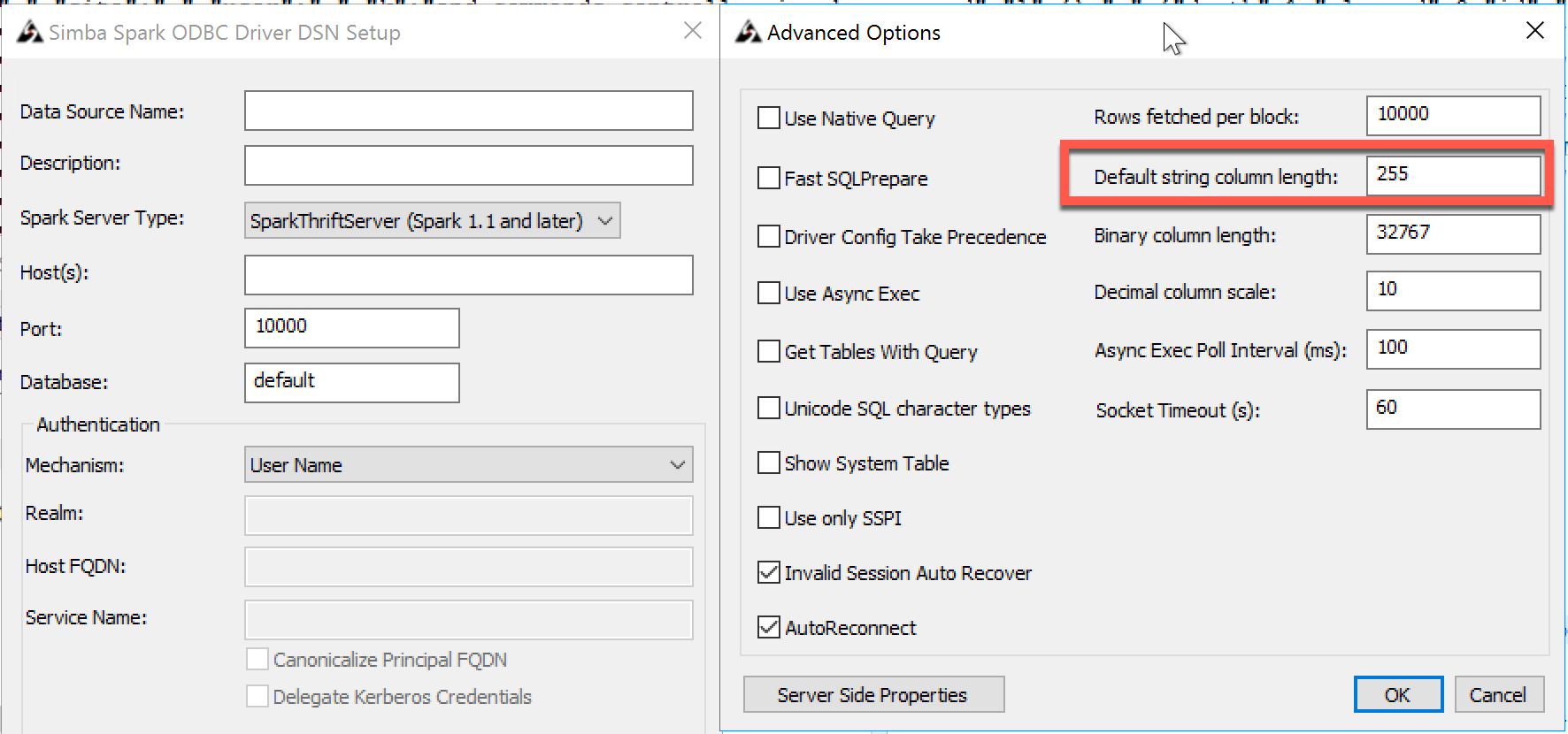
The truncation of the 'string' field to 255 characters is caused by a default String Column Length within SparkSQL ODBC driver.
Lösning
Option 1 (recommended)
Use a TDC file to increase the String Column Length:
| <?xml version='1.0' encoding='utf-8' ?> <connection-customization class='databricks' enabled='true' version='10.4'> <vendor name='databricks'/> <driver name='databricks'/> <customizations> <customization name='odbc-connect-string-extras' value='DefaultStringColumnLength=500' /> </customizations> </connection-customization> |
Option 2
Change the default value from DSN setup and then use Other Databases (ODBC) connector:
Ytterligare resurser
Simba Spark ODBC Driver with SQL Connector (scroll to "Default String Column Length" section)
Connecting to Databricks
Use TDC file on Tableau Desktop
Use TDC file on Tableau Server
Databricks - Tableau
Knowledge-artikelnummer
001496542
Löste denna artikel ditt problem?
Berätta för oss vad vi kan förbättra!
