選擇組織
Display Rank Based on Grand Total in Crosstab
發佈日期: Apr 29, 2025
描述
How to display Rank based on the Grand Total in a crosstab.
Cause
This feature is currently not built in Tableau Desktop.The Rank calculation fields must be placed on the shelf as discrete. However, if the discrete fields are placed on the shelf, the Total cannot be displayed.
解決方案
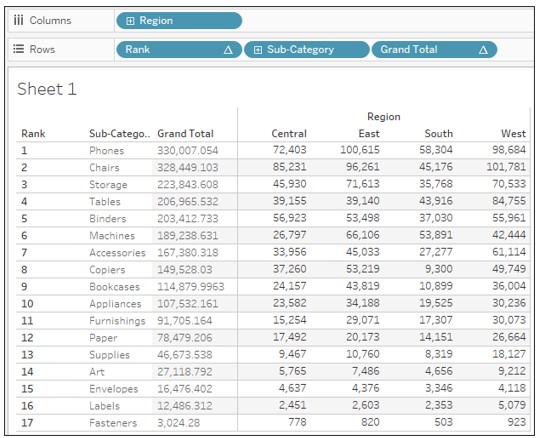
1. Connect to the Sample-Superstore datasource.
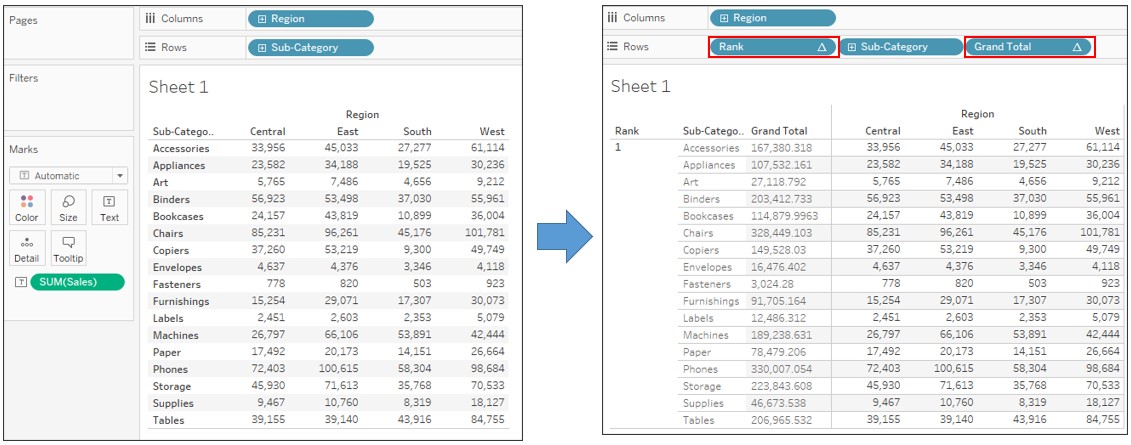
2. Drag Region to Columns and Sub-Category to Rows.
3. Drag Sales to Text on the Marks card.
4. Create a new calculated field as follows:
Name : Grand Total
Calculation : TOTAL(SUM([Sales]))
5. Right-click on Grand Total and select Convert to discrete.
6. Create a new calculated field as follows:
Name : Rank
Calculation : RANK([Grand Total])
7. Right-click on Rank and select Convert to discrete.
8. Drag Rank to the far-left position of Rows and Grand Total to the right-most position of Rows.
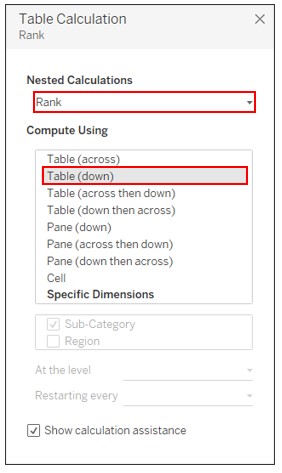
9. Right-click on Rank on Rows and select Edit Table Calculation to set the following:
知識文章編號
001496845
此文章是否解決您的問題?
請讓我們知道,以便我們改進!
