Seleziona un'organizzazione
Unable To Register MFA Using TOTP Code Issued From Google Authenticator Extension For Chrome
Data pubblicazione: Feb 24, 2025
Descrizione
When trying to register Google Authenticator Extension for Chrome as MFA, the following error occurs and unable to register even though the correct code was entered.
"That code is invalid or expired. Try another"
Cause
The time isn’t correctly synced on your Google Authenticator Extension for Chrome.Risoluzione
- Update the clock on the computer where the Google Authenticator Extension is installed to match the clock on the time server.
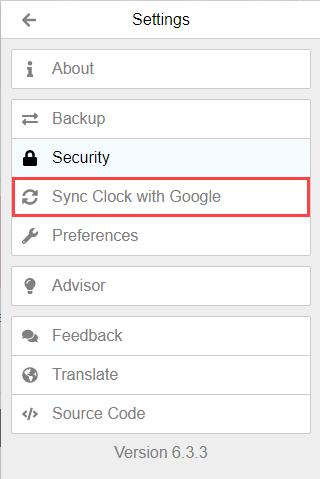
- Go to the main menu on the Google Authenticator Extension.
- Select Settings
- Select Sync Clock with Google
Numero articolo Knowledge
001497087
Questo articolo ha risolto il problema?
Facci sapere, così possiamo migliorare!
