組織を選択
Trailing full width spaces are not trimmed when publishing the workbook on Tableau Server
公開日: Apr 30, 2025
説明
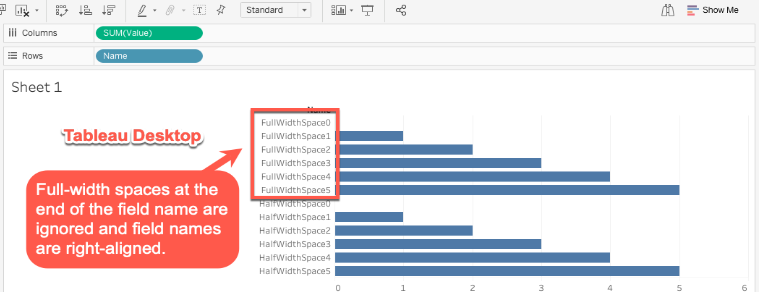
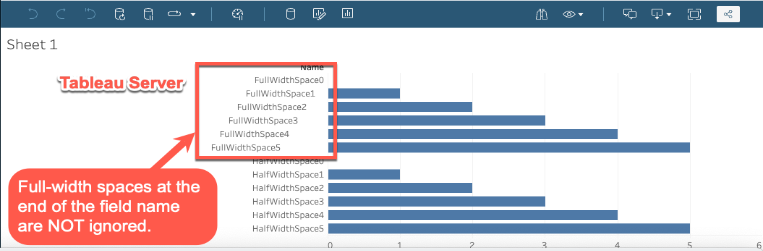
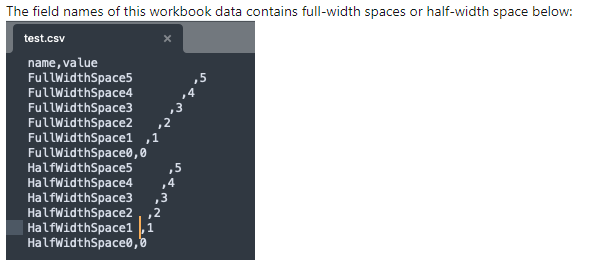
When there are full-width (Japanese) spaces at the end of the field names, rendering results may look different on web browsers when publihsed on Tableau Server and on Tableau Desktop.
Before publishing in Tableau Desktop.
After publishing on Tableau Server.
Cause
This is by design. Due to the differences in processing the full width spaces with Tableau and the web browsers, the rendering result is different when there are full width spaces at the end of the field names. Full size spaces at the end of the field names are trimmed/ignored in Tableau Desktop.解決策
Below are possible workarounds:
1. Use server rendering. add "?:render=false" at the end of the view's URL
2. Remove full-width spaces from underlying data.
3. Use REGEX function in Tableau to remove the trailing spaces in field names.
example: REGEXP_REPLACE([<name>], ' +$', '')
その他のリソース
ナレッジ記事番号
001497276
この記事で問題は解決されましたか?
ご意見をお待ちしております。
