Välj en organisation
Tableau Desktop failed to connect to Salesforce Marketing Cloud with Error Code: B19090E0
Publiceringsdatum: Feb 24, 2025
Beskrivning
An error occurred while communicating with the Salesforce Marketing Cloud data source 'Salesforce Marketing Cloud'
Error Code: B19090E0
For input string: " "
Error Code: B19090E0
For input string: " "

Cause
"Subdomain" below needs subdomain only not full URI or https:// prefix.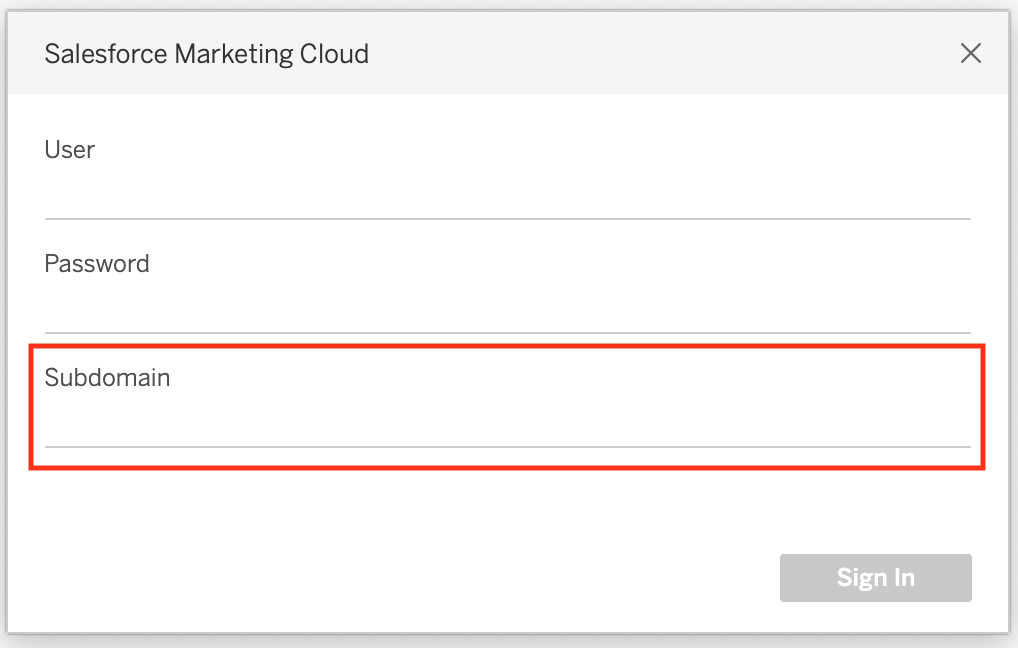
Lösning

If you don't see the connector for Salesforce Marketing Cloud in Tableau Desktop and showing the dialog for filling the sub domain, make sure the driver is installed.
Salesforce Marketing Cloud
Ytterligare resurser
Note that B19090E0 is a relatively common error code. An alternative issue for this error code with the same connector, with a very similar error message, exists in the following article from the Tableau Knowledge Base:
Error B19090E0 when Connecting to Salesforce Marketing Cloud from Tableau Destkop with MFA
Knowledge-artikelnummer
001497376
Löste denna artikel ditt problem?
Berätta för oss vad vi kan förbättra!
