Sélectionner une organisation
"Error code: E19090E0 [q0.Security]Login failed" when connecting Tableau Desktop to Salesforce Marketing Cloud
Date de publication: Jun 10, 2026
Description
When connecting Tableau Desktop to Salesforce Marketing Cloud data through the native connector, the following error occurs:
Bad connection: Tableau could not connect to the data source.
Error code: E19090E0
[q0.Security]Login failed......
Connector class: cdama_sfmarketingcloud. Version 21.8272.0
Cause
Multi-factor authentication (MFA) is enabled, but MFA isn’t supported for Salesforce Marketing Cloud connection by design.Résolution
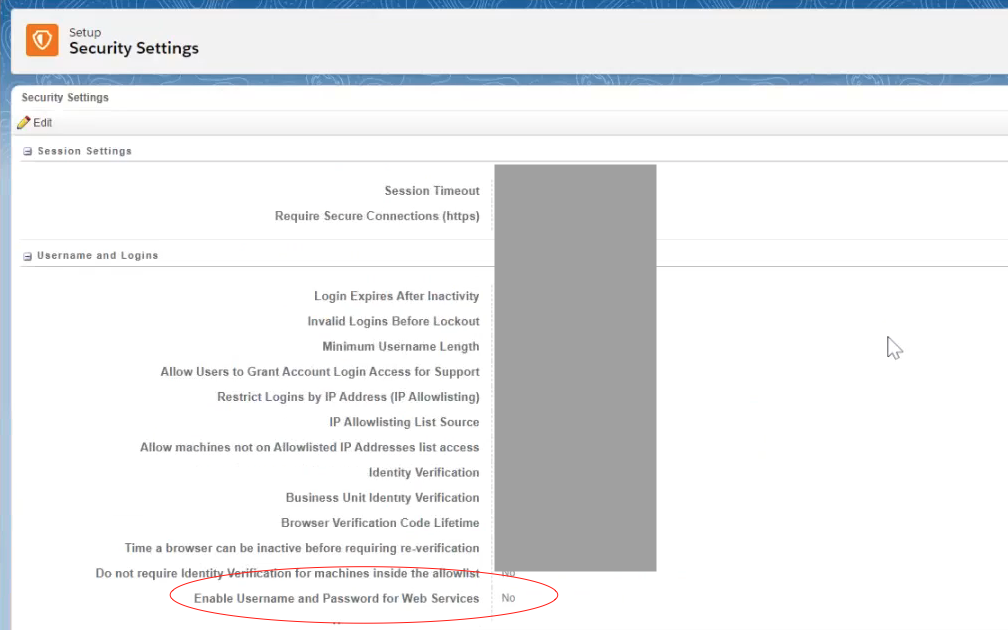
1. Ensure that "enable username and password for Web Services" in Salesforce Marketing Cloud -> Security Settings is enabled (on the parent domain; change will be reflected in the child domain).
2. Disable MFA (contact Salesforce Support to change this setting if necessary). MFA might not need to be disabled after performing step 1 so attempt to connect from Tableau Desktop and only proceed with step 2. if still unable to connect.
Note: Tableau is excluded from the Salesforce MFA requirement. Review Salesforce Multi-Factor Authentication FAQ for details.
Ressources supplémentaires
Connect Tableau to Salesforce Marketing Cloud
Numéro d’article de la base de connaissances
001498604
Cet article a-t-il résolu votre problème ?
Dites-nous ce que nous pouvons améliorer !
