Выбрать организацию
"Error code: E19090E0 [q0.Security]Login failed" when connecting Tableau Desktop to Salesforce Marketing Cloud
Дата публикации: Jun 10, 2026
Описание
When connecting Tableau Desktop to Salesforce Marketing Cloud data through the native connector, the following error occurs:
Bad connection: Tableau could not connect to the data source.
Error code: E19090E0
[q0.Security]Login failed......
Connector class: cdama_sfmarketingcloud. Version 21.8272.0
Cause
Multi-factor authentication (MFA) is enabled, but MFA isn’t supported for Salesforce Marketing Cloud connection by design.Решение
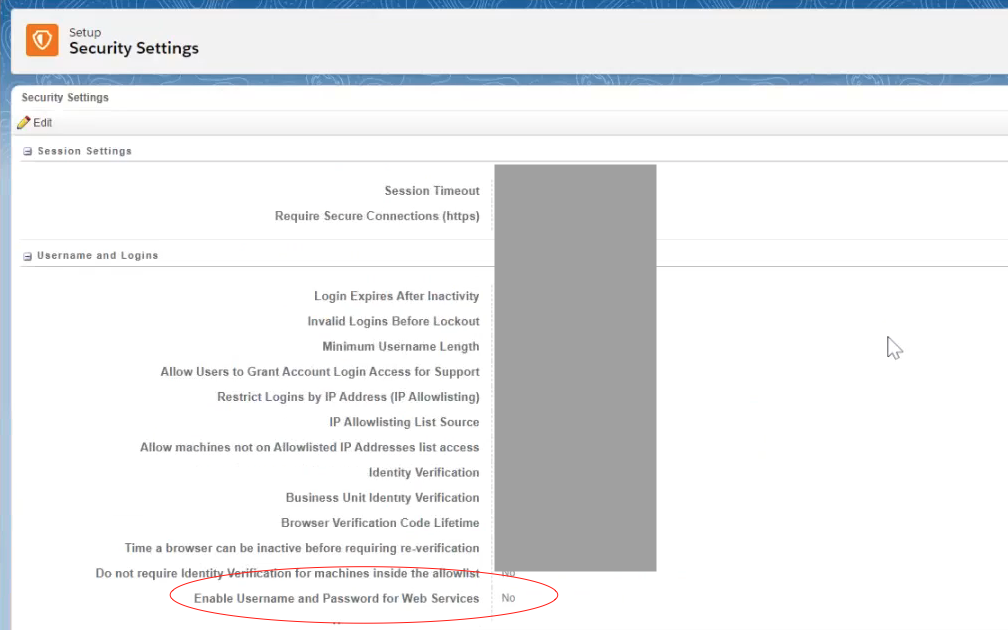
1. Ensure that "enable username and password for Web Services" in Salesforce Marketing Cloud -> Security Settings is enabled (on the parent domain; change will be reflected in the child domain).
2. Disable MFA (contact Salesforce Support to change this setting if necessary). MFA might not need to be disabled after performing step 1 so attempt to connect from Tableau Desktop and only proceed with step 2. if still unable to connect.
Note: Tableau is excluded from the Salesforce MFA requirement. Review Salesforce Multi-Factor Authentication FAQ for details.
Дополнительные ресурсы
Connect Tableau to Salesforce Marketing Cloud
Номер статьи базы знаний
001498604
Эта статья решила вашу проблему?
Оставьте свой отзыв, чтобы мы могли стать лучше!
