Выбрать организацию
Tableau Desktop Sign In Tableau Server Failed: "SSL peer certificate or SSH remote key was not OK error code: 9F4C5638"
Дата публикации: Apr 13, 2024
Описание
Tableau Desktop sign in Tableau Server failed with the error:
SSL peer certificate or SSH remote key was not OK error code: 9F4C5638
Cause
The forward proxy of Tableau Server overwrites the SSL certificate.Решение
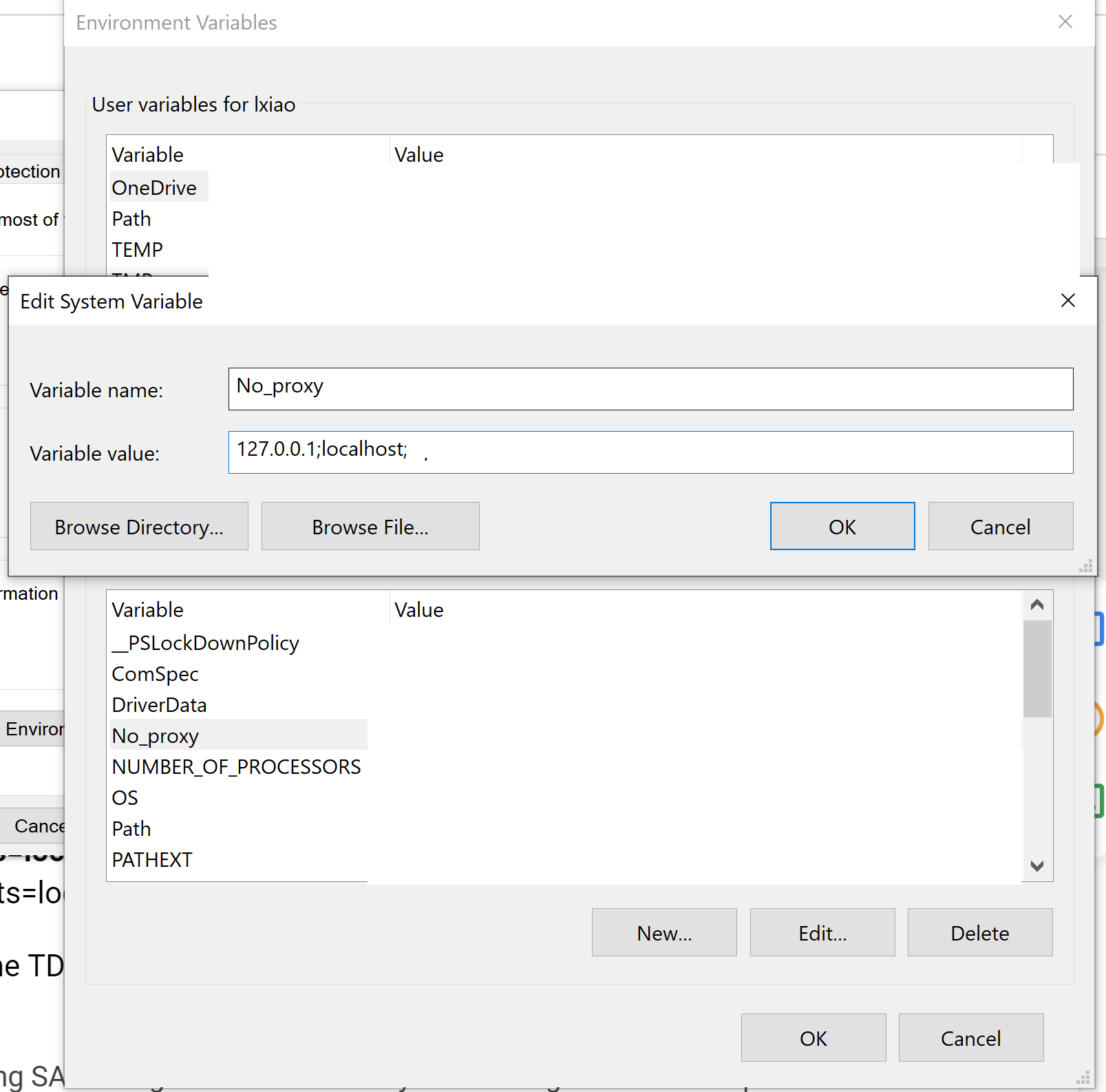
- On Tableau Desktop machine, set no_proxy variables and the value is 127.0.0.1, localhost, tabxxxx6 (hostname), xx.xx.xx.xx (Tableau Server IP), .xxx.co.xx (domain)
- On Tableau Desktop machine, C:\Program Files\Tableau\Tableau 2022.1\bin\jre\conf\net.properties -- change http.nonProxyHosts=localhost|127.*|[::1] to #http.nonProxyHosts=localhost|127.*|[::1]
- Test sign in again.
Номер статьи базы знаний
001498622
Эта статья решила вашу проблему?
Оставьте свой отзыв, чтобы мы могли стать лучше!
