Seleziona un'organizzazione
How to Replace Missing Values to Zeros and Display the Rank without Considering the Column Dimension
Data pubblicazione: Apr 24, 2025
Operazione
When missing values exist in a view, labels are displayed only for the existing values. And also, the rank is calculated per each column.
How to display the rank for all values, including missing values, without considering the column dimension?

Fasi

1. Add Category to Rows.
2. Create a calculated field and name it Sales whose missing values are replaced to zero.
ZN(LOOKUP(SUM([Sales]),0))3. Add YEAR(Order Date) and Sales whose missing values are replaced to zero to Columns.
4. Create a calculated field and name it Total sales per category.
{ EXCLUDE DATEPART('year', [Order Date]) : SUM([Sales]) }
5. Create a calculated field and name it Cumulative average of sales.
WINDOW_AVG(SUM([Total sales per category]),FIRST(),LAST())6. Create a calculated field and name it Rank.
RANK([Cumulative average of sales])7. Add Rank to Label.
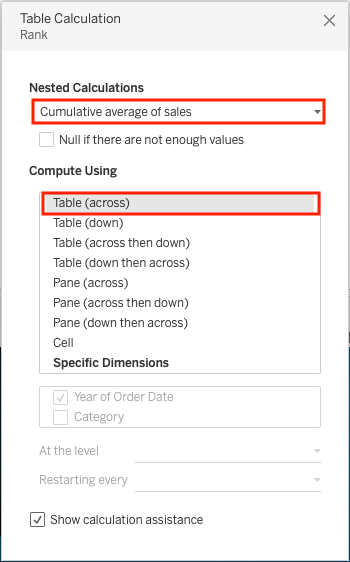
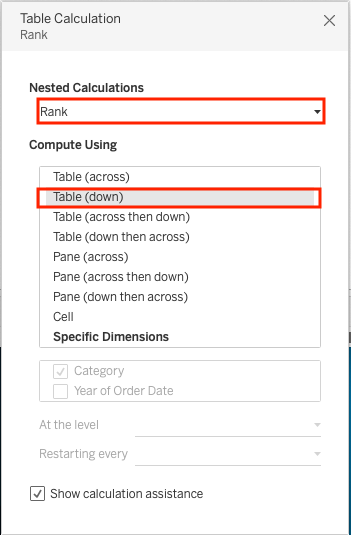
8. Right-click Rank in the Marks card, and select Edit Table Calculation. Configure it as follows;
Numero articolo Knowledge
001498730
Questo articolo ha risolto il problema?
Facci sapere, così possiamo migliorare!
