Seleziona un'organizzazione
Error "Bad Request: The data source does not contain the expected data Error Code A7AE75CC" Connecting to Google Drive
Data pubblicazione: Apr 6, 2026
Descrizione
When connecting to Google Drive, the following error may error:
An error occurred while communicating with Microsoft Excel
Bad Request: The data source does not contain the expected data.
Error Code: A7AE75CC Google Drive has rejected this request because of insufficient permissions.
Bad Request: The data source does not contain the expected data.
Error Code: A7AE75CC Google Drive has rejected this request because of insufficient permissions.
or
Unable to complete action
Bad Request: The data source does not contain the expected data.
Error Code: A7AE75CC Google Drive has rejected this request because of insufficient permissions.
Unable to complete action
Bad Request: The data source does not contain the expected data.
Error Code: A7AE75CC Google Drive has rejected this request because of insufficient permissions.
Cause
-
Root cause 1
Google's API does not allow connections to files larger than 10MB.
Note: Google Drive may show a smaller file size than the actual size. Download the file to your local drive to verify the correct size.
-
Root cause 2
The Google account has insufficient permission of this file.
-
Root cause 3
The ability to connect to Google Sheets that contains pivot tables is not currently built into the product. To voice your support, please add your vote to the following Community Idea for this feature.
Salesforce Ideas:
Support connections to Google Sheets that have a tab with a pivot table
Allow Google Sheet with pivot table
Risoluzione
Option 1
Reduce the size of the file you are connecting to. For example, consider copying the sheet(s) you want to connect to into a new workbook that doesn't contain any large sheets.
Option 2
Verify and grant permission of this file for this Google account.
Option 3
If you cannot connect to a particular Google Sheets (.gsheet), check to see if the file contains pivot tables. If pivot tables are included, delete them, or copy the pivoted data to another Google Sheets and connect to it.
Risorse aggiuntive
For additional information about this limitation, refer to the third party links below*.
*Although we make every effort to ensure links to external websites are accurate, up to date, and relevant, Tableau cannot take responsibility for the accuracy or freshness of pages maintained by external providers. Contact the external site for answers to questions regarding its content.
You may receive this error message above also when the Google account have insufficient permission if the file is shared from another place.
Under Google Drive, right click the file from "Shared with me". If the "Move to" is disabled, this Google account has insufficient permission and as a result, Tableau has insufficient permission when connecting to this file under this Google account.
.
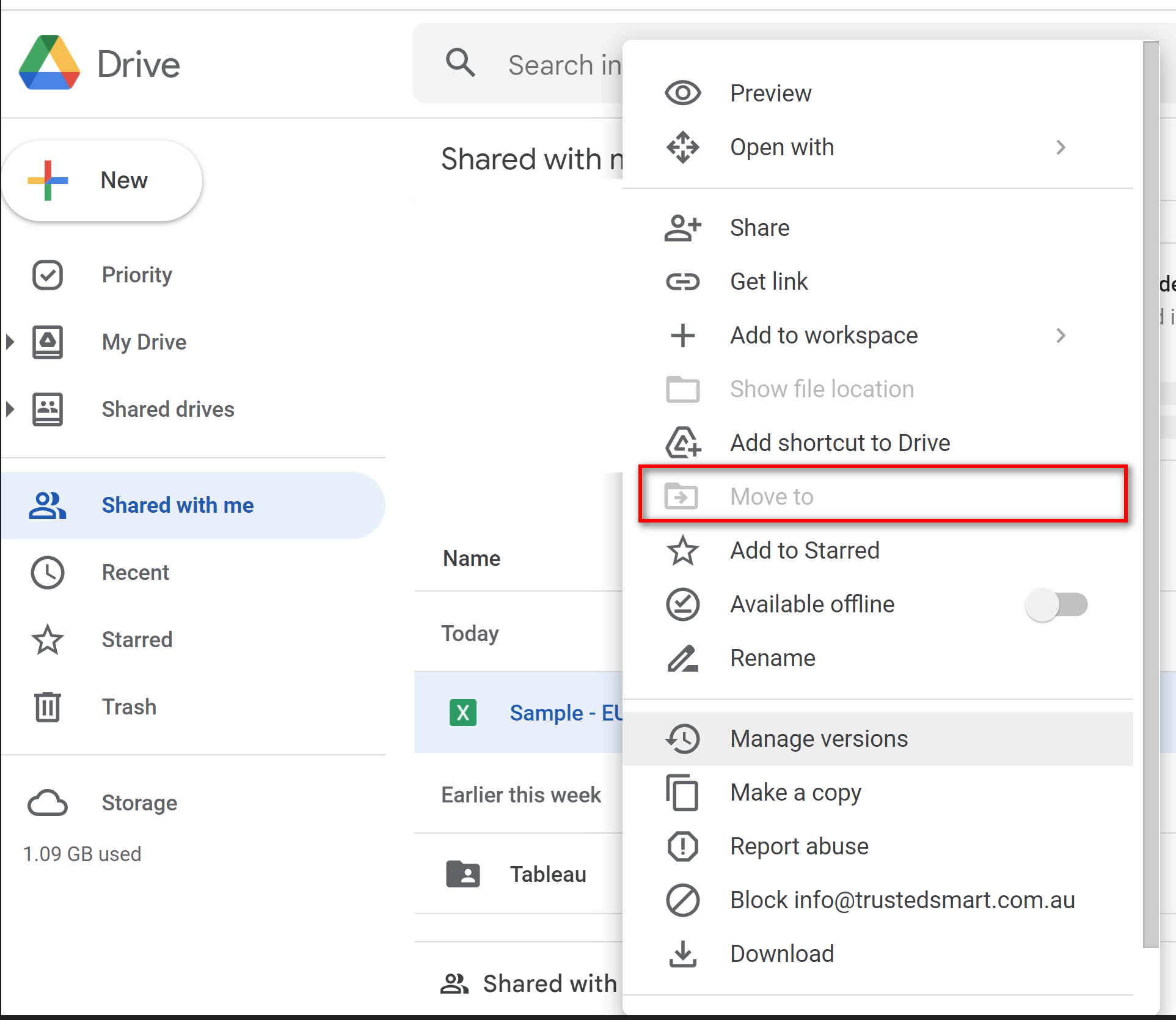
There are two ways to grant permissions:
- Choose "Make a copy" and move the copy to "My Drive" somewhere. Then Tableau has the permission to connect to this file copy under this Google account.
- The file owner can transfer the ownership to this Google account so that this Google account has the "Move to" permission. Then move the file to "My Drive" somewhere and Tableau has the permission.
Also see:
Error "connectionSettings is undefined" Connecting to a .gsheet File
Numero articolo Knowledge
001534485
Questo articolo ha risolto il problema?
Facci sapere, così possiamo migliorare!
