Выбрать организацию
Install Tableau Resource Monitoring Tool Prerequisites Failed
Дата публикации: Feb 28, 2025
Описание
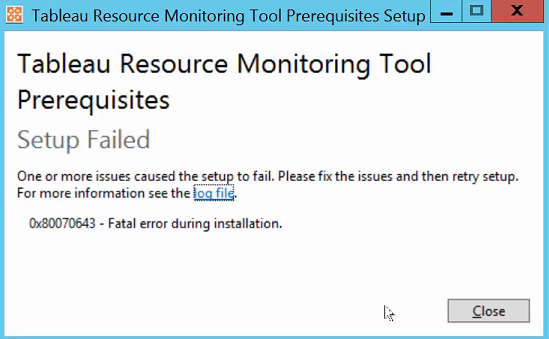
Upon installing Tableau Resource Monitoring Tool Prerequisites, the following error occurs:
Tableau_Resource_Monitoring_Tool_Prerequisites_xxxx
[10FC:129C][2020-05-11T16:18:01]i323: Registering package dependency provider: {EBD57923-971E-4657-B032-2214A27F3FD5}, version: 20.1.0, package: TableauResourceMonitoringToolPrerequisitesSetup_2020_1.20.0326.1604_x64.msi
[10FC:129C][2020-05-11T16:18:01]i301: Applying execute package: TableauResourceMonitoringToolPrerequisitesSetup_2020_1.20.0326.1604_x64.msi, action: Install, path: C:\ProgramData\Package Cache\{EBD57923-971E-4657-B032-2214A27F3FD5}v20.1.0\TableauResourceMonitoringToolPrerequisitesSetup-2020-1.20.0326.1604-x64.msi, arguments: ' MSIFASTINSTALL="7" INSTALLDIR="D:\Tableau\Tableau Resource Monitoring Tool\prerequisites"'
[10FC:129C][2020-05-11T16:18:02]e000: Error 0x80070643: Failed to install MSI package.
[10FC:129C][2020-05-11T16:18:02]e000: Error 0x80070643: Failed to execute MSI package.
[17D0:16E8][2020-05-11T16:18:02]e000: Error 0x80070643: Failed to configure per-machine MSI package.
[17D0:16E8][2020-05-11T16:18:02]i319: Applied execute package: TableauResourceMonitoringToolPrerequisitesSetup_2020_1.20.0326.1604_x64.msi, result: 0x80070643, restart: None
[17D0:16E8][2020-05-11T16:18:02]e000: Error 0x80070643: Failed to execute MSI package.
[10FC:129C][2020-05-11T16:18:02]i329: Removed package dependency provider: {EBD57923-971E-4657-B032-2214A27F3FD5}, package: TableauResourceMonitoringToolPrerequisitesSetup_2020_1.20.0326.1604_x64.msi
Tableau_Resource_Monitoring_Tool_Prerequisites_xxxx_TableauResourceMonitoringToolPrerequisitesSetup_[verison]_x64.msi
CAQuietExec64: Set installation directory: D:\Tableau\Tableau Resource Monitoring Tool\prerequisites\
CAQuietExec64: Checking PowerShell CLR version
CAQuietExec64: 'powershell.exe' is not recognized as an internal or external command,
CAQuietExec64: operable program or batch file.
CAQuietExec64: Executing PowerShell initialization script
CAQuietExec64: 'powershell.exe' is not recognized as an internal or external command,
CAQuietExec64: operable program or batch file.
CAQuietExec64: Error running initialization script. Exit code indicated a failure. Actual exit code: 9009, expected: 42
CAQuietExec64: Error 0x80070001: Command line returned an error.
CAQuietExec64: Error 0x80070001: QuietExec64 Failed
CAQuietExec64: Error 0x80070001: Failed in ExecCommon64 method
CustomAction InvokeSetup returned actual error code 1603 (note this may not be 100% accurate if translation happened inside sandbox)
Cause
The 'powershell.exe' is not recognized as an internal or external command so that PowerShell initialization script cannot be executed to install MSI package.Решение
- Check if C:\WINDOWS\System32\WindowsPowerShell\v1.0\ has been added into System environment variables.
- In Search, search for and then select: System (Control Panel)
- Click the Advanced system settings link
- Click Environment Variables. In the section System Variables, find the PATH environment variable and select it. Click Edit. Add the path of powershell.
- Uninstall Resource Monitoring Tool (https://help.tableau.com/v2020.1/server/en-us/rmt-admin-uninstallation.htm)
- Reinstall Tableau Resource Monitoring Tool prerequisites
Номер статьи базы знаний
001534573
Эта статья решила вашу проблему?
Оставьте свой отзыв, чтобы мы могли стать лучше!
