Sélectionner une organisation
Gateway and Prep Conductor failed to start when using External SSL with passphrase to protect the key file after upgrade to Tableau Server 2022.1.17
Date de publication: Apr 13, 2024
Description
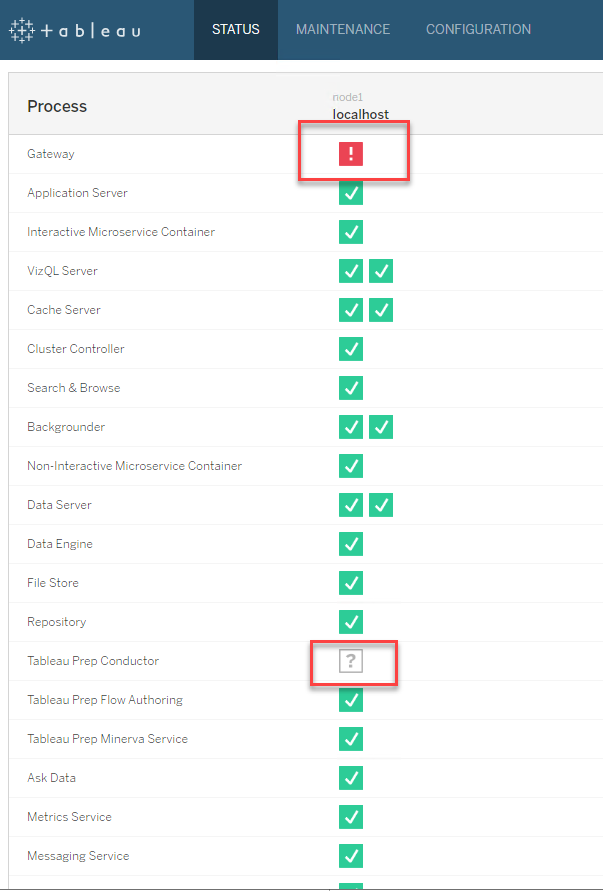
The SSL certificate file and key file worked fine on previous version of Tableau Server such as 2022.1.16 and earlier, and we did not have any typo in the passphrase.
Cause
From Tableau Server which are relelased on 8/17/2023, meaning 2021.3.26, 2021.4.21, 2022.1.17, 2022.3.9, 2023.1.5, Tableau upgraded OpenSSL (a third-party open source component ) version from 1.1 to 3.1 for security enhancing reason.Based on the OpenSSL 3.0 official document, some old cryptographic algorithms have been retired and disabled.
If you are using a retired cryptographic algorithm above to create passphrase to protect your key file, Tableau Server which are relelased on 8/17/2023 and later will also can not decrypt your key file any more, which leads to the Gateway and Prep Conductor process fail.
Résolution
You can find the cryptographic algorithm name from the head part of the key file details.
For example, the "DES-CBC" behind "DEK-Info" should be the cryptographic algorithm you are using.
=====
-----BEGIN RSA PRIVATE KEY-----
Proc-Type: 4,ENCRYPTED
DEK-Info: DES-CBC, xxxxxxxx
=====
2. If the the cryptographic algorithm you confirmed at step 1 is listed in the OpenSSL 3.0 official document below, then use an old version of OpenSSL such as 1.1 to update your key file with a cryptographic algorithm which is supported by OpenSSL 3.1, such as AES256.
https://www.openssl.org/docs/man3.0/man7/OSSL_PROVIDER-legacy.html
you can use the OpenSSL included in the old Tableau Server version which were released before 8/17/2023 to update your key file easily.
Here is a simple example to show how to use OpenSSL 1.1 included in Tableau Server 2022.1.16 to do that.
Steps:
2-1 Upload your key file to one of your Tableau Server 2022.1.16 node which include gateway process.
2-2 Run the below command to move to the directory that includes OpenSSL 1.1.
cd /d C:\Program Files\Tableau\Tableau Server\packages\apache.20221.23.0709.1525\bin2-3 Run the below command to update the cryptographic algorithm of your key file. Here is an example to update the cryptographic algorithm with AES256.
openssl rsa -aes256 -in "<the path where you saved your key file>\test.key" -out "<the path where you saved your key file>\test_aes256.key"2-4 Input your current passphrase of the key file when prompt showing "Enter pass phrase for xxxxxx\test.key".
2-5 Input a new passphrase or the same one you are using when prompt showing "writing RSA key Enter PEM pass phrase:".
2-6, Input the passphrase that you input at step 2-5 again when prompt showing "Verifying - Enter PEM pass phrase:".
2-7 Run the below command to move to the directory that includes OpenSSL 3.1 on Tableau Server 2022.1.17.
cd /d C:\Program Files\Tableau\Tableau Server\packages\apache.20221.23.0811.1403\bin2-8 Run the below command to check if OpenSSL 3.1 on Tableau Server 2022.1.17 can decrypt your new key file to show its details.
openssl pkey -in "<the path where you saved your key file>\test_aes256.key" -text -noout2-9 Use the new key file you created to configure External SSL on your Tableau Server 2022.1.17.
Ressources supplémentaires
Numéro d’article de la base de connaissances
001534649
Cet article a-t-il résolu votre problème ?
Dites-nous ce que nous pouvons améliorer !
