Sélectionner une organisation
Number Types Are Recognized as String When Importing Files (Excel, CSV, etc) to Tableau
Date de publication: Apr 7, 2025
Description
When importing file-based data to Tableau, the fields are recognized as [Dimension - String] even though these fields only contain numbers and NULL.
For example, in the below data, [Number2] and [Number3] only has numbers but are recognized as STRING in Tableau. 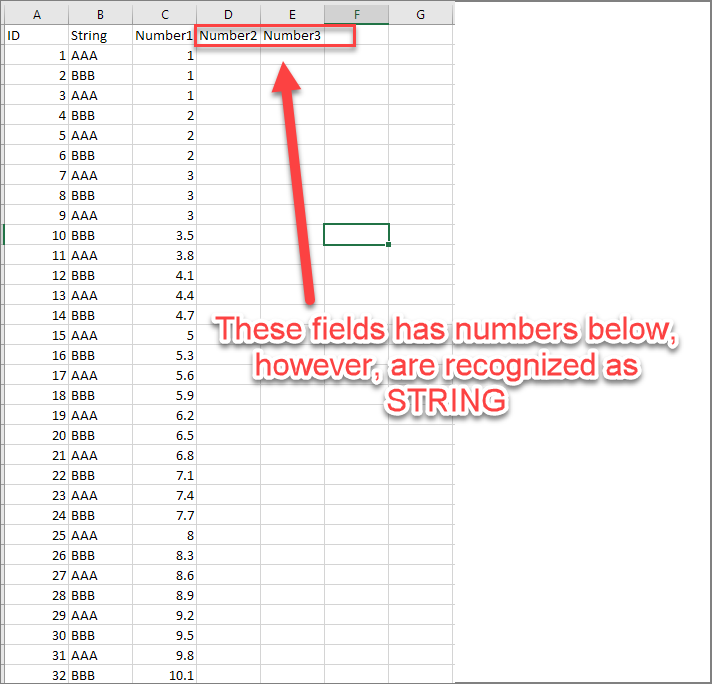
Cause
This is by design. Tableau determines how to map mixed-value columns to data types by the data types of the first 10,000 rows in an Excel data source, and the first 1,024 rows in a CSV data source.
If the first 10,000 rows in an Excel data are NULL, Tableau will determine this field as STRING even if it has number values after 10000 rows.
Data Types -- Mixed data types in data from files
Résolution
Option 1
After importing data from files to Tableau, hold the Shift key, select multiple fields, and change them from strings to "continuous measure" decimals in a batch.
Option 2
Move the rows with numbers to the first rows, then load the data into Tableau.
Please check the image below. 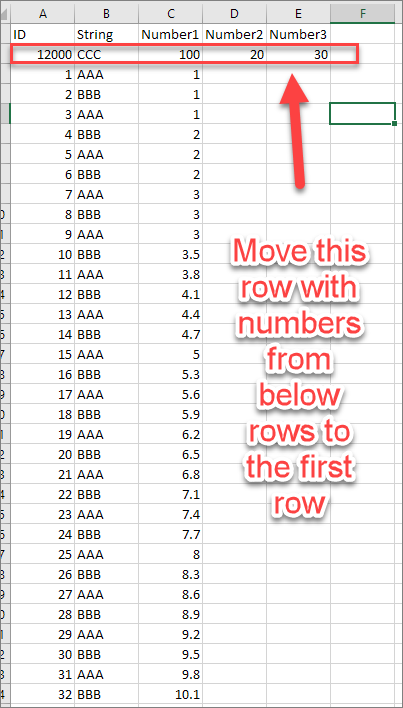
Numéro d’article de la base de connaissances
001534772
Cet article a-t-il résolu votre problème ?
Dites-nous ce que nous pouvons améliorer !
