Välj en organisation
"Tableau Server couldn’t authenticate you automatically" error occurs when attempting to automatically log in using Kerberos SSO after Tableau Server upgrade
Publiceringsdatum: Jun 2, 2025
Beskrivning
After upgrading to a Tableau Server version released June 2023 or later, users receive the error "Tableau Server couldn’t authenticate you automatically" and are unable to log in automatically with Kerberos SSO.
Cause
Java was upgraded in Tableau Server versions released June 2023 or later. As a result, Tableau Server no longer supports RC4 or 3DES encryption types in keytabs. You’ll see this error after upgrading to a newer version of Tableau Server while using an unsupported encryption type for Kerberos.Lösning
Add support for the stronger AES128 and AES256 encryption types and remove both RC4 and 3DES encryption as they’re no longer considered secure. See Understanding Keytab Requirements for more information.
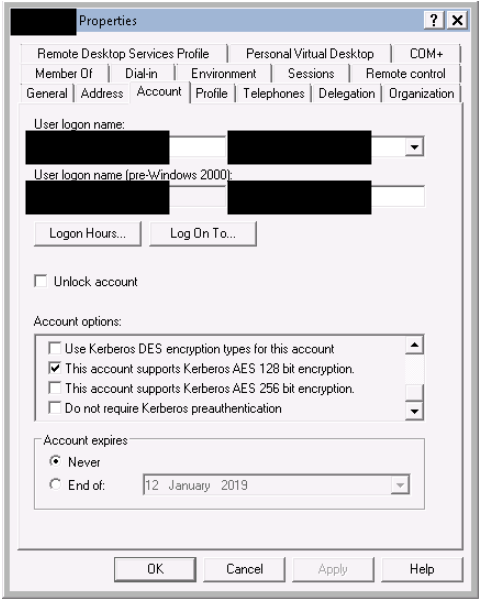
NOTE: If your environment is using a Run as Service account for Tableau Server, one or both of the following options must be enabled on the user account in Active Directory, or the encryption type will default back to RC4:
- This account supports Kerberos AES 128-bit encryption.
- This account support Kerberos AES 256-bit encryption.
Ytterligare resurser
Identifying a match for this issue:
1. Confirm if the Tableau Server version is June 2023 or later.
2. Review Tableau Server "vizportal" logs (see Tableau Server Logs and Log File Locations) to identify the message: "Failure unspecified at GSS-API level (Mechanism level: Encryption type RC4 with HMAC isn’t supported/enabled)".
Knowledge-artikelnummer
001534942
Löste denna artikel ditt problem?
Berätta för oss vad vi kan förbättra!
