Sélectionner une organisation
LBLM Activation Fails with Error "The Tableau license server at https://atr.licensing.tableau.com:443/ returned an error"
Date de publication: Jan 31, 2025
Description
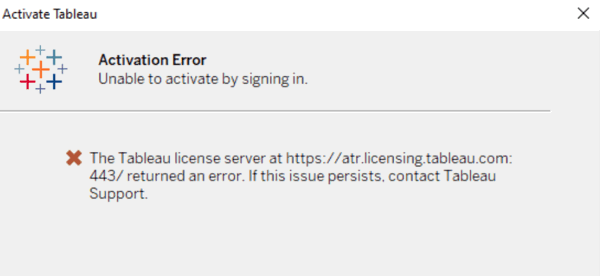
When trying to activate Tableau Desktop or Tableau Prep Builder using Login-based License Management (LBLM), the following error may occur:
Unable to activate by signing in. The Tableau license server at https://atr.licensing.tableau.com/443 returned an error. If the issue persists contact Tableau Support.
Cause
The Tableau Server is not able to reach the ATR Licensing service due to a forward proxy or network issue.Résolution
Option 1
Check Tableau Server connectivity to the ATR licensing server and possibly select an offline activation for Tableau Server.
Paste the following URL into a browser or at a curl command prompt on the Tableau Server computer:
https://atr.licensing.tableau.com/_status/healthz
If Tableau Server is able to access the licensing server, an "OK" message displays. Otherwise, an error such as "Can't reach this page" may be displayed.
To resolve this issue, work with your networking team to unblock access to atr.licensing.tableau.com:443 on the Tableau Server computer as well as the other URLs noted in the Communicating with the Internet guide. It is also possible to perform an offline activation of Tableau Server when there are network restrictions. See this Tableau Online Help for instructions on performing an offline activation.
Option 2
The proxy server or Run as Service account is not configured correctly.
Configure the forward proxy server on Tableau Server as described in the Tableau Online Help guide.
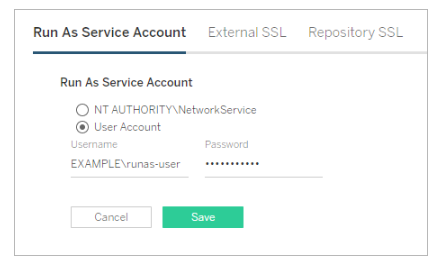
Note: The proxy server needs to be configured for the Tableau Server run as service account: Run As Service Account. It is not possible to configure the proxy for the NT AUTHORITY\NetworkService account, hence Tableau must be configured for the Run As Service Account. Using the Run as Service account allows the proxy to be configured in the LAN settings.
Check Forward proxy configuration in this detailed way:
- Check the run as user permission:
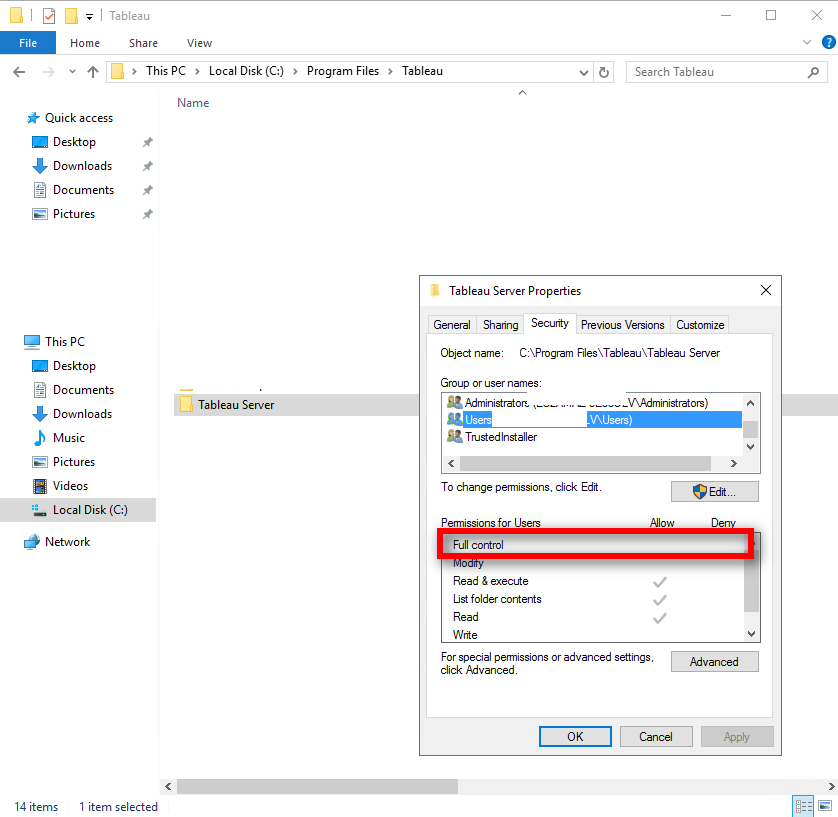
- Go to Tableau Server folder, Right click and go to "Properties" - "Security".
- Check if the TSM "Run as User account" user appears in "Group or user names" as the above image or not. Make sure the user name exactly matches here and TSM Run as User account user name. e.g. EC2AMAZ\Administrator. If not, add this user name by clicking Edit > Add.
- Check if this user name has Full control permission. If not, allow it.
- if "LOCAL SERVICE" and "NETWORK SERVICE" are not there or don't have the "Full control". Add them in.
- Go to Tableau Server folder, Right click and go to "Properties" - "Security".
- Check System environment variables setting:
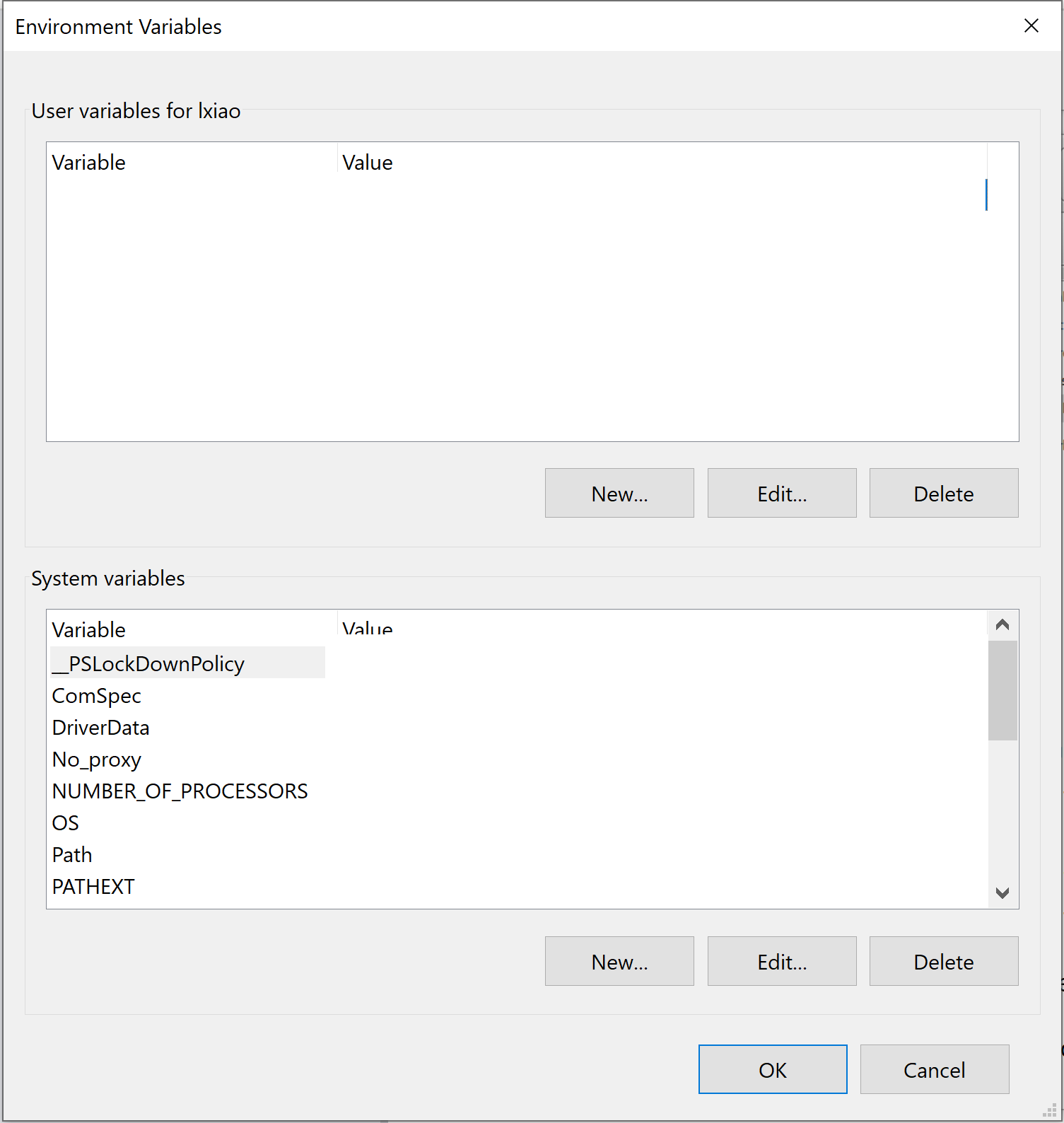
- Use Windows search bar and input "Edit the System Environment Variables" then go to Environment Variables.
- If http_proxy and https_proxy is not under System variables, create them. e.g. the forward proxy IP is 192.168.1.200:8080, then set http_proxy value as http://192.168.1.200:8080 and https_proxy value as http://192.168.1.200:8080.
- Restart the Windows server to allow the permission and environment variables change is effective.
- After restart and Tableau Server services are all up and running, go to TSM and configure the correct Run as user account user name and password and then save the pending changes and restart Tableau Server services.
- Now test LBLM activation again.
-
After you have tested the proxy settings, remove the Run As service account from the Local Administrators group. Leaving the Run As service account in the administrator group elevates the permissions of the Run As service account and is a security risk. Restart Tableau Server to ensure that all changes are implemented
Ressources supplémentaires
How login-based license management works
Configuring Tableau Server on Windows to work with a forward proxy
Run As Service Account
Configure device proxy and Internet connectivity settings
Numéro d’article de la base de connaissances
001537618
Cet article a-t-il résolu votre problème ?
Dites-nous ce que nous pouvons améliorer !
