조직 선택
Label Visibility Issues With Long Text in OmniScript Elements
게시 일자: Mar 8, 2026
상세 설명
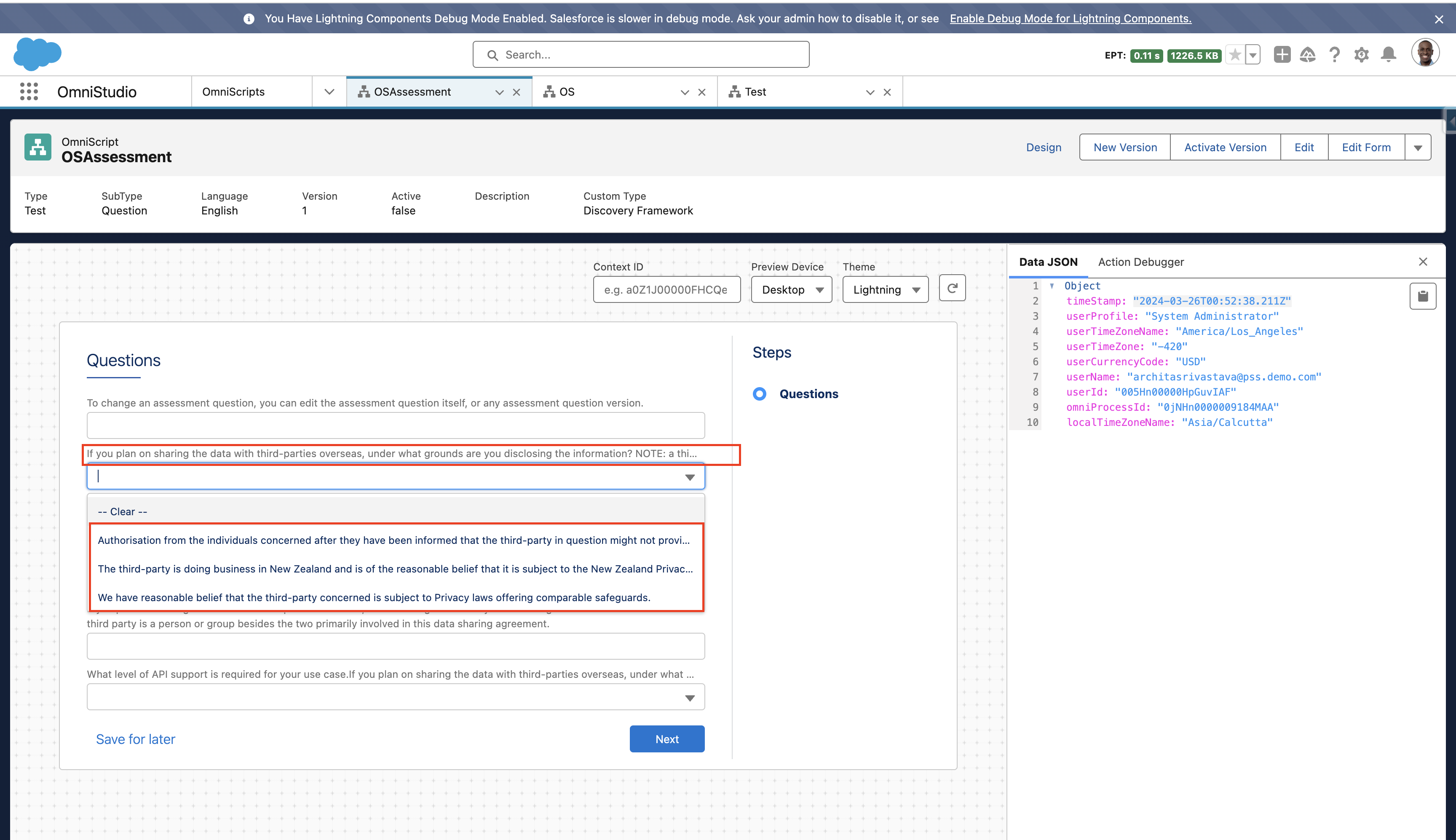
When OmniScript elements contain labels or option values with long text (approximately more than 110 characters), the text may not display correctly in some scenarios.
Common observations include:
- Text Input and Select element labels may be truncated or not fully visible when previewing the OmniScript, especially in the Newport theme.
- Select element option labels may also appear truncated when the text length exceeds the available display space.
- In mobile view, long labels may appear truncated with ellipses (
...) or may appear misaligned instead of wrapping to the next line.
Steps to Reproduce (Example):
- Navigate to OmniScripts from the App Launcher.
- Open an existing OmniScript or create a new one.
- Add a Text Input or Select element.
- Enter a label or option value with more than 110 characters.
- Preview the OmniScript (for example in Newport theme or mobile view).
The label or option value may appear truncated or not fully visible.
솔루션
This behaviour can occur due to UI layout limitations when displaying long text in certain OmniScript themes or views.
Possible approaches include:
1. Use Text Block for Long Labels
If a label contains long descriptive text, consider using a Text Block element to display the text and then place the Input/TextArea element below it.
2. Override CSS for Select Elements (Managed Runtime)
If Managed Runtime is enabled, the label wrapping behavior can be adjusted by overriding CSS.
Example CSS for Select labels:
label.slds-form-element__label[omnistudio-combobox_combobox_slds]{
white-space: normal !important;
}
Example CSS for Select option values:
.slds-listbox__option-text_entity[omnistudio-combobox_combobox_slds] {
white-space: normal !important;
}
These approaches can help ensure that long labels or option values display more clearly within OmniScript interfaces.
Knowledge 기사 번호
001622587
이 기사를 통해 문제를 해결했습니까?
개선을 위한 의견을 보내주세요.
