Valitse organisaatio
Salesforce For Outlook (SFO) stops working when we switch to "New Outlook" in Outlook Desktop client
Julkaisupäivä: Sep 25, 2025
Kuvaus
Here's how we can verify this change:
- In Outlook, click on this toggle button to switch on the new Outlook
- This updates the UI of Outlook to OWA-based Outlook UI.
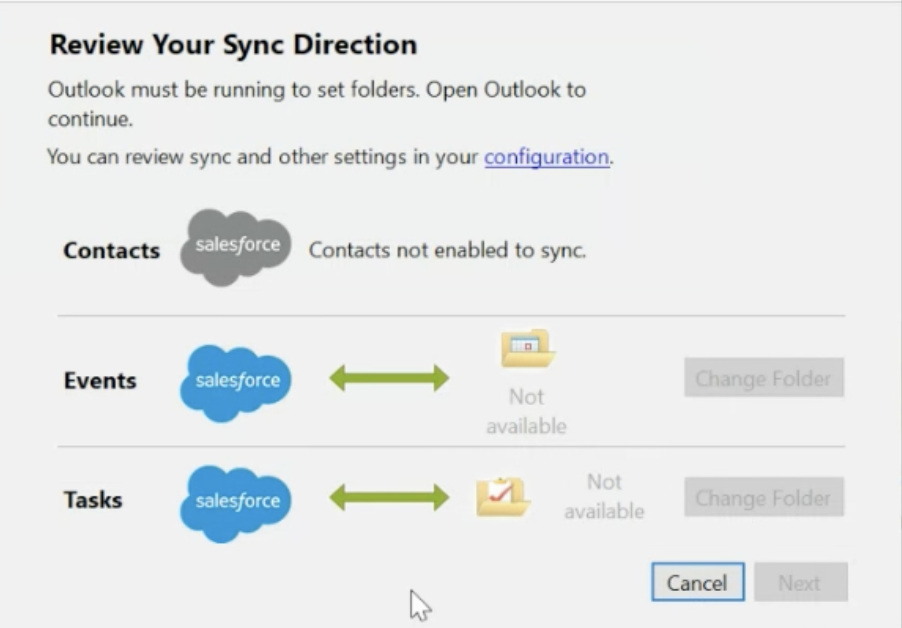
- However, the SFO stops working after this. If we try to reconnect by adding our credentials, it will not be able to find the folders and we cannot connect the SFO application as we will be stuck on below screen.

Ratkaisu
Workaround
To continue working on SFO, please use classic Outlook for Windows instead of New Outlook. This is limited by design.
Unfortunately, the New Outlook doesn’t support COM add-ins such as Salesforce For Outlook.
As per the comms shared by Microsoft here
"In the new Outlook for Windows, web add-ins are fully supported, with no additional work required from partners. COM Add-ins will not be supported in the new Outlook for Windows but will continue to work in classic Outlook for Windows. COM add-ins could manipulate Outlook in many ways but that often led to instability and crashes in Outlook. Web add-ins provide a sandboxed environment for add-ins to operate in and have checks and balances in place to ensure Outlook is more stable and robust."
Knowledge-artikkelin numero
001677394
Ratkaisiko tämä artikkeli ongelmasi?
Anna palautetta, jotta voimme kehittyä!
