조직 선택
Retrieve Standard Countries and accompanying States/Territories via the Metadata API
게시 일자: Oct 1, 2024
상세 설명
The Standard Countries list is provided in the article below:
Standard Countries and Territories for Address Picklists
However, this does not provide the states associated with each country.
We can use Metadata API to pull the Standard Countries list along with the states related to them.
솔루션
1) Create a sample package.xml as below :
<?xml version="1.0" encoding="UTF-8"?>
<Package xmlns="http://soap.sforce.com/2006/04/metadata">
<version>46.0</version>
<types>
<members>Address</members>
<name>Settings</name>
</types>
</Package>
2) Use the above package.xml in the Manifest file in the VS Code. Then right click on the Manifest file and select "SFDX: Retrieve Source in Manifest from Org"
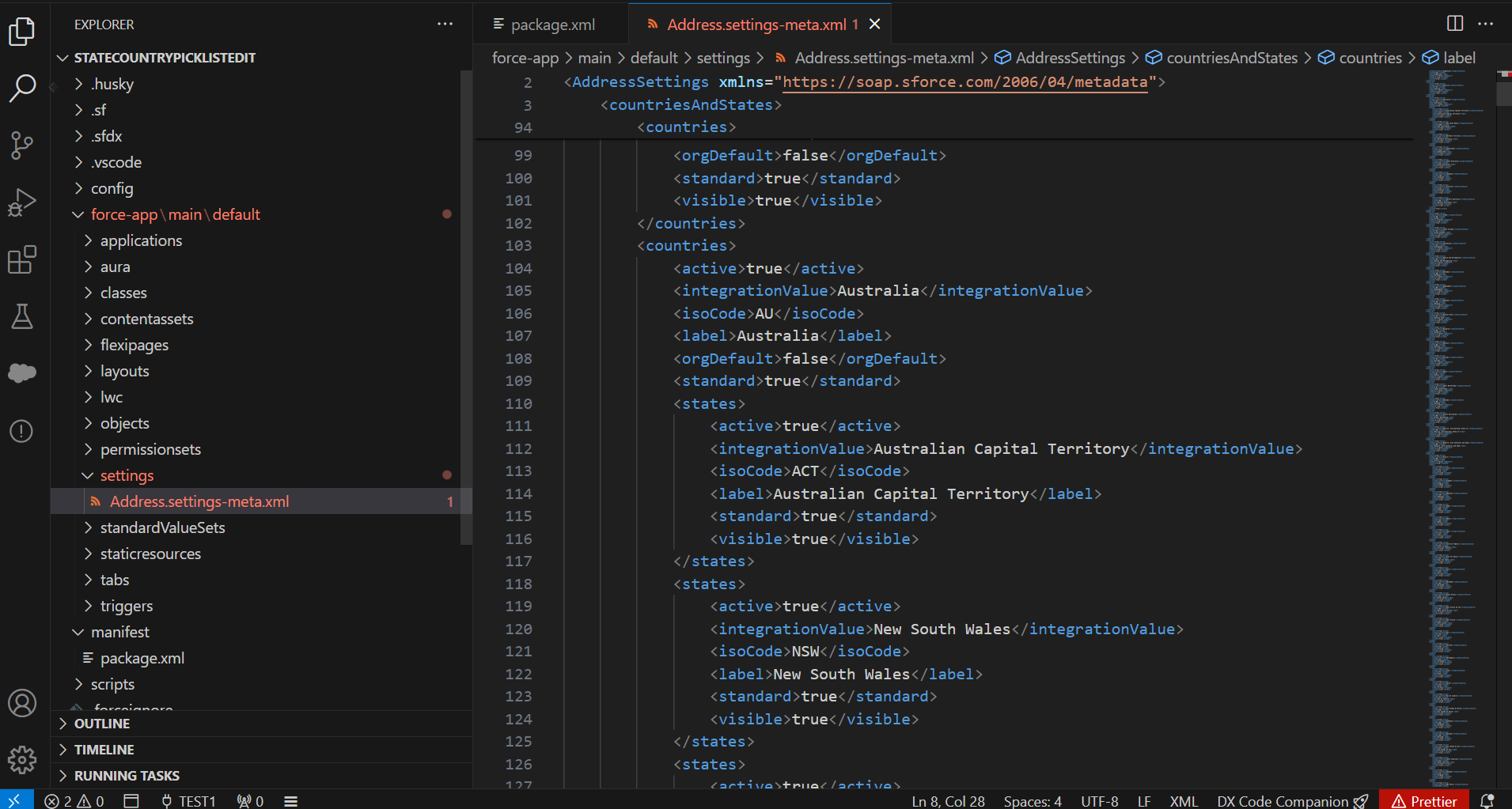
3) A new folder called "settings" is created under the force-app\main\default section.
4) The file "Address.settings-meta.xml" under settings folder would display all the Countries and their accompanying state values in the VS Code as below :
Knowledge 기사 번호
002233551
이 기사를 통해 문제를 해결했습니까?
개선을 위한 의견을 보내주세요.
