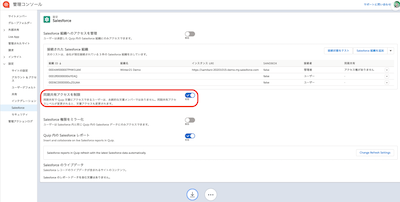
Salesforce 連携をして、Salesforce レコードの文書へのアクセス権を Salesforce のレコードのアクセス権と揃えたい場合の設定です。
[管理コンソール] | [設定] | [同期共有アクセスを制限] を有効にすると、Salesforce レコードに紐付いた文書へのユーザーのアクセス権は、Salesforce 上でのユーザーの権限に一致、つまり「参照のみ」の場合は「文書も参照のみ可能」という状態になります。
詳しくは 同期共有アクセス制限 [社外公開可] を参照してください。
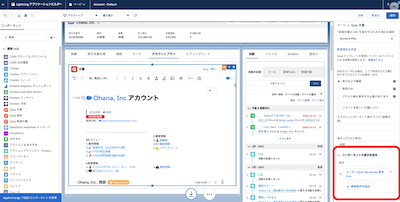
同じく、アプリケーションビルダー上での設定で表示/非表示を切り替えることができます。
詳細は Quip コンポーネントの表示/非表示切り替え [社外共有可] をご覧ください。
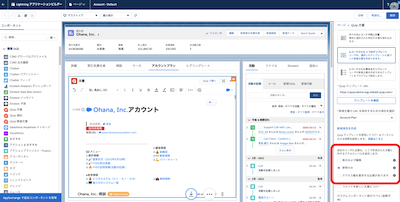
テンプレートを埋め込む画面で「アクセス権を要求する必要があります」または「参照のみ」に設定すると、「テンプレートから新規作成」というボタンを押した作成者のみがフルアクセスとなり、他の人は必要に応じてアクセス権を要求または参照のみ、という状態になります。
002369794

We use three kinds of cookies on our websites: required, functional, and advertising. You can choose whether functional and advertising cookies apply. Click on the different cookie categories to find out more about each category and to change the default settings.
Privacy Statement
Required cookies are necessary for basic website functionality. Some examples include: session cookies needed to transmit the website, authentication cookies, and security cookies.
Functional cookies enhance functions, performance, and services on the website. Some examples include: cookies used to analyze site traffic, cookies used for market research, and cookies used to display advertising that is not directed to a particular individual.
Advertising cookies track activity across websites in order to understand a viewer’s interests, and direct them specific marketing. Some examples include: cookies used for remarketing, or interest-based advertising.
