Valitse organisaatio
How to Install WMIC Feature on Demand on Windows 11 for MuleSoft Anypoint Studio
Julkaisupäivä: Mar 27, 2026
Kuvaus
Anypoint Studio uses WMIC (Windows Management Instrumentation Command-Line) through a dependency. As per Microsoft, starting with Windows 11, version 24H2, WMIC is not preinstalled. To use MuleSoft Anypoint Studio, users need to install the WMIC service.
If WMIC.exe is not installed or not enabled from your setup, you’ll see this error message when you attempt a WMIC command in the command prompt: ‘wmic’ is not recognized as an internal or external command, operable program, or batch file.

Ratkaisu
Steps to install the WMIC (Windows Management Instrumentation Command-Line) service for Anypoint Studio:
- Search for Optional features directly from the taskbar's search menu.
- Search the Installed features section to find WMIC.
-
If WMIC isn’t on the list of Installed features, you can easily add it by taking these steps:
- At the top of the Optional features tab, locate Add an optional feature.
- In that field, select View features. This will open a popup window.
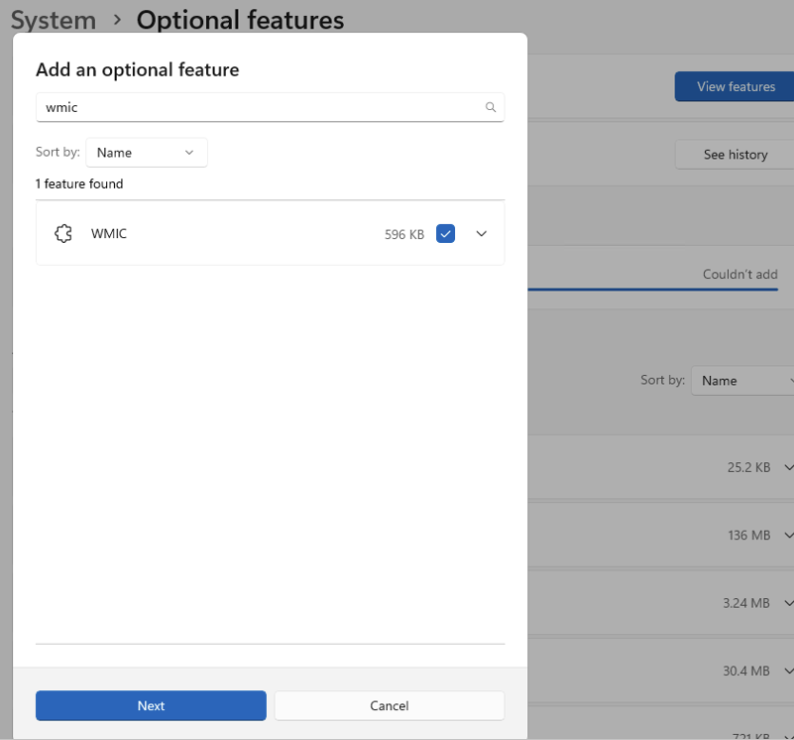
- In the popup window to Add an optional feature, type “WMIC” into the search box.
- When WMIC appears in the results below, select it by checking the box next to it. (Note: WMIC will not appear in the results if it’s already installed.)
- Select Next to install the WMIC feature in the same popup window.

For addtional assistance installing WMIC on Windows 11, please review the Microsoft Windows IT Pro Blog.
Knowledge-artikkelin numero
002418021
Ratkaisiko tämä artikkeli ongelmasi?
Anna palautetta, jotta voimme kehittyä!
