조직 선택
Extract Refresh Error "undefined binding [Product2].[Id]" After Integrating Sales with Embedded Salesforce Credentials
게시 일자: Jun 15, 2026
상세 설명
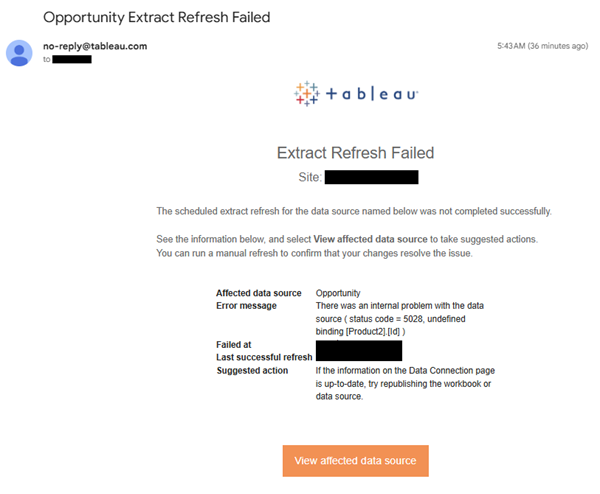
Extract refresh failed with the following "undefined binding [product2].[id]" error after integrating Sales to generate a sample Opportunity data source with embedded salesforce credentials in the connection.
Affected data source Opportunity
Error message There was an internal problem with the data source ( status code = 5028, undefined binding [Product2].[Id] )
Failed at {timestamp}
Last successful refresh {timestamp}
Suggested action If the information on the Data Connection page is up-to-date, try republishing the workbook or data source.
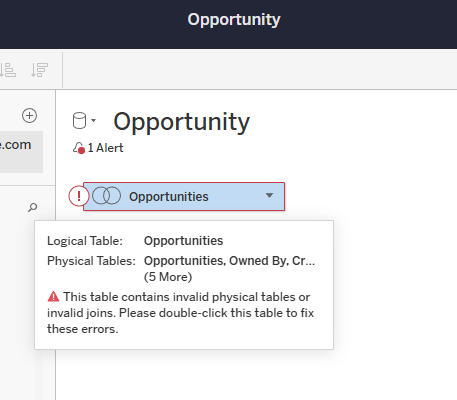
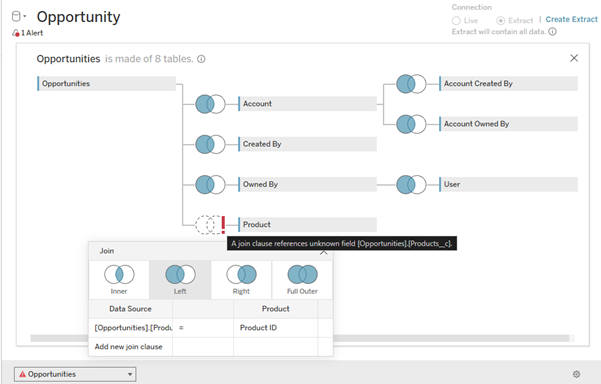
When editing the generated Opportunity data source on the web and confirming the canvas of the Data Source page, the following errors are displayed:
Logical layer:
This table contains invalid physical tables or invalid joins. Please double-click this table to fix these errors.
Physical layer:
A join clause references unknown field [Opportunities].[Products__c].
Cause:
The issue occurs when the "Product" field does not exist in the "Opportunities" object.
솔루션
- In Salesforce, navigate to Setup
- Click on Object Manager at the top of the page
- Verify that the Opportunity object has the necessary Product fields added to use this sample starter "Opportunity" data source.
For more information, please refer to the following Salesforce documents:
Find Object Management Settings in Lightning Experience
Manage the Products on Your Opportunities
Make Products required on Opportunities
Knowledge 기사 번호
002471444
이 기사를 통해 문제를 해결했습니까?
개선을 위한 의견을 보내주세요.
