Seleccionar una organización
Conversation Component Title is Truncated at High Browser Zoom Levels
Fecha de publicación: Jun 16, 2026
Descripción
In a three-column record layout of a messaging session, when the browser zoom is set to levels greater than or equal to 200%, the label in the conversation component becomes truncated, as shown in the image below. Specifically, the full-length word in the conversation component label is not fully displayed in this layout.
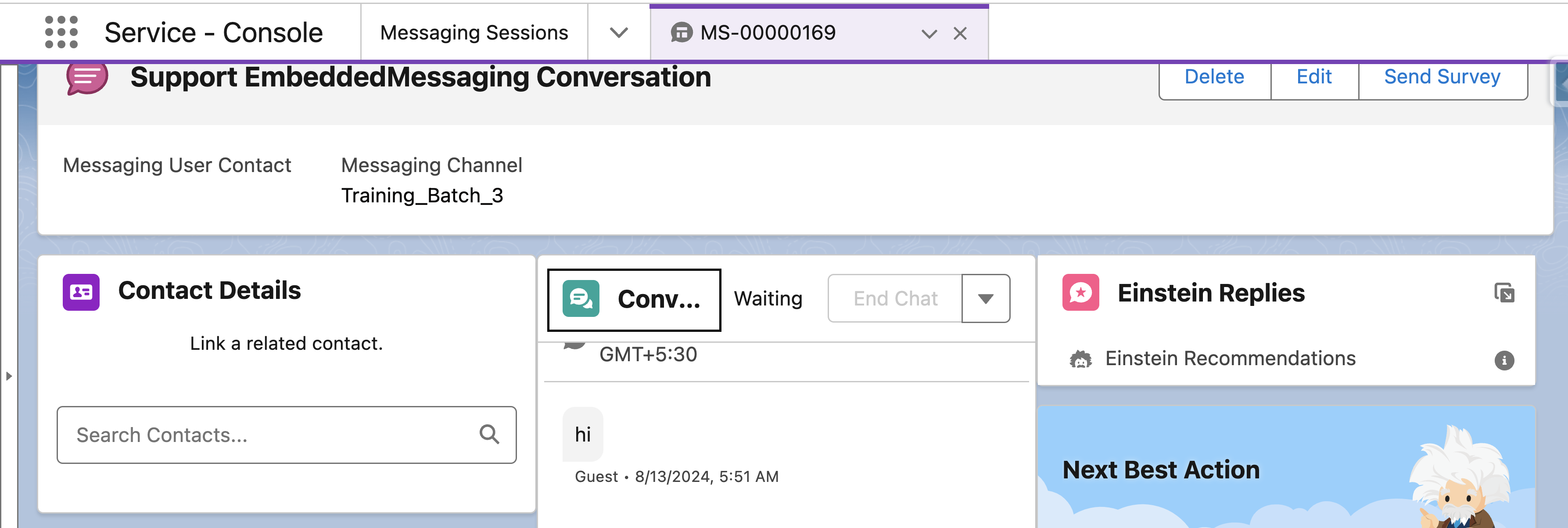
(Screenshot above shows the truncated label in a 3-column layout at 200% zoom)
Solución
This is working as designed. The Conversation component label truncation only occurs in 3-column record layouts when browser zoom is set to 200% or higher.
Recommended action: Switch to a single-column layout for Messaging Sessions when operating at 200% zoom or higher.
Recursos adicionales
See also Record Layout
Número del artículo de conocimiento
002523519
¿Resolvió este artículo su problema?
¡Háganos saber cómo podemos mejorar!
