조직 선택
Users With Server Administrator Role (Explorer) do not Show Under All Sites When Site Role Filter is Applied
게시 일자: Apr 15, 2025
상세 설명
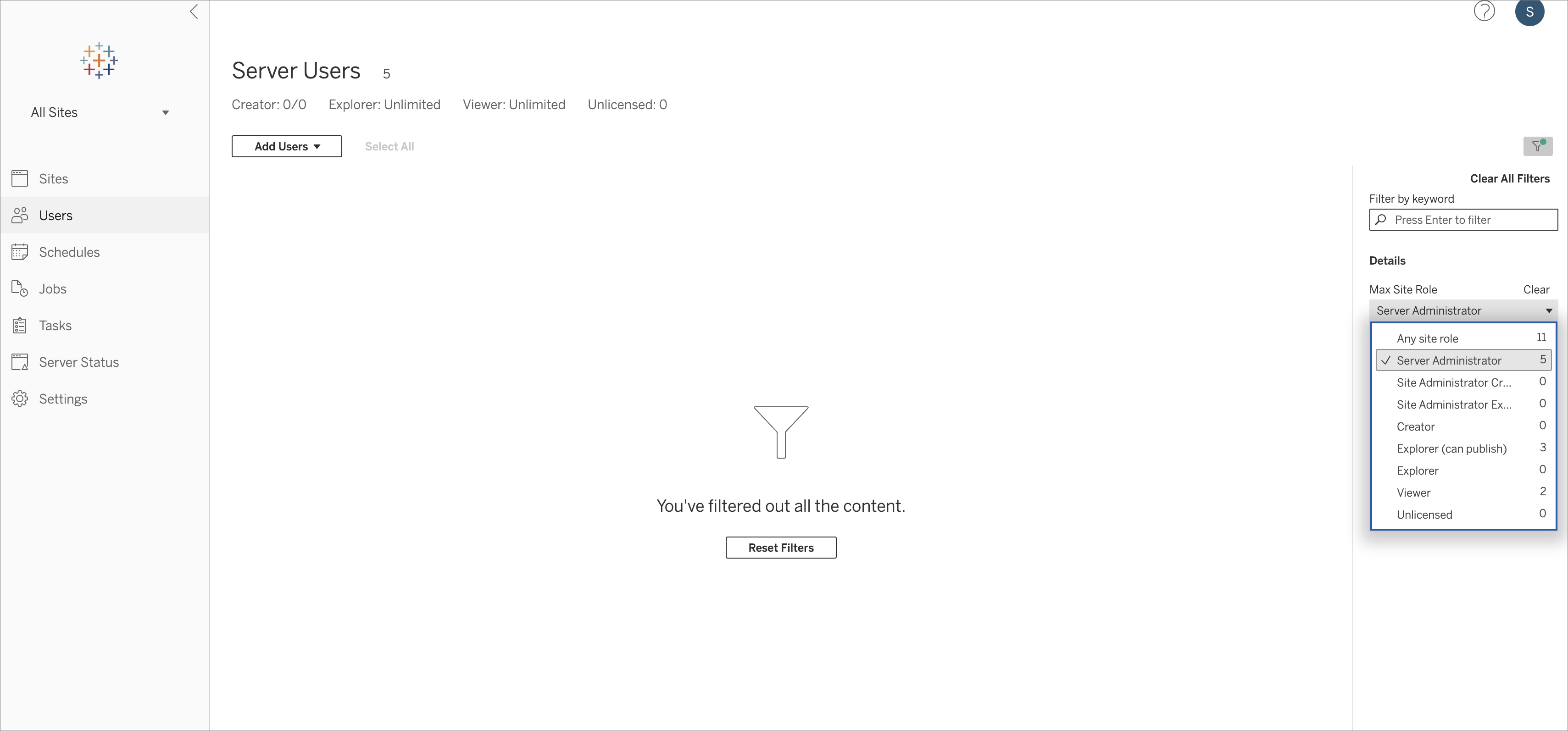
On Tableau Server with Core-based licensing, users with Server Administrator role (Explorer) do not show up under All Sites when site role filter is applied. This issue does not reproduce on Tableau Server with User-based licensing.
This issue was found in Tableau Server versions 2024.2.x, 2023.3.2, 2023.1.8, and 2022.3.9.
Cause
This issue is being investigated by the Tableau Development Team under Known Issue ID W-16787686.
솔루션
This issue is being investigated by the Tableau Development Team under Known Issue ID W-16787686.
There is no known workaround at this time.
추가 자원
Steps to Reproduce
-
In Tableau Server with Core based licenses, create multiple Sites.
-
Add a few Server Administrators to each Site and also other Site Roles, like Explorer or Viewer.
-
Click on Manage All Sites > Users
It will display all the users (including Server Administrator) -
Click on Filter > Max Site Role and select Server Administrator
It will not display any Server Administrator -
Click on Filter > Max Site Role and select Explorer or Viewer
It will correctly display the list of users.
Knowledge 기사 번호
002724471
이 기사를 통해 문제를 해결했습니까?
개선을 위한 의견을 보내주세요.
