Seleccionar una organización
Understand the functionality of Check Agent Capacity on Reopened Work Items
Fecha de publicación: Jun 3, 2026
Descripción
Under the capacity settings in the Service Channel. The following two checkboxes
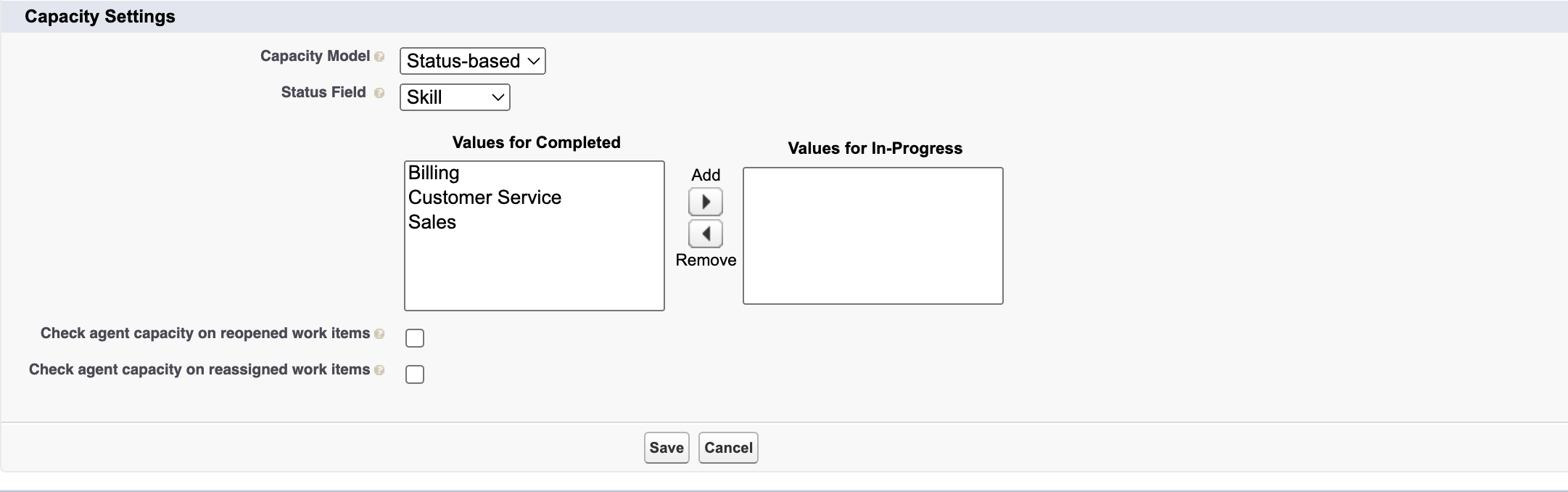
- Screenshot showing the 'Check agent capacity on reopened work items' and 'Check agent capacity on reassigned work items' checkboxes in the Service Channel capacity settings page in Salesforce Setup.
If the above-mentioned checkboxes are unchecked and we assign the work item to the user, then there can be two scenarios for deciding the agent capacity.
Note: Any work item that is once routed via Omni Routing will consume the agent’s capacity irrespective of the way of assigning the work item. Only those work items that aren’t routed once via Omni Routing in the whole life span will not be consuming the capacity of the agent.
Solución
The capacity counting behavior depends on how the work item was assigned and routed. Review the two scenarios below:
Primary Scenario: If the work item is assigned manually to the agent (not via any Omni Queue or Any Automation that involves Omni Routing ), it will not count against the agent’s capacity. This is because the work item assigned manually to the agent will not have any Pending Service Routing record along with the Agent Work record. Hence, it will not be counted against the capacity of the agent.
Secondary Scenario: If the work item is assigned to the agent and it is routed via Omni Routing in the whole life span of the work item then it will be counted against the agent’s capacity irrespective of the manual assignment because the work item was routed via Omni Routing once in its life span.
Número del artículo de conocimiento
002727382
¿Resolvió este artículo su problema?
¡Háganos saber cómo podemos mejorar!
