Seleziona un'organizzazione
Mule 4 | Database Connector - How to Convert Timestamps with Date Type Stored in an Oracle Database Table Running in a Local Timezone to Another Timezone
Data pubblicazione: Oct 30, 2024
Descrizione
A CloudHub app where all apps are running in UTC timezone connects to an on-premise Oracle database. Oracle database is started and is working in a local timezone. Say, in Sydney/Australia, +11 hours:
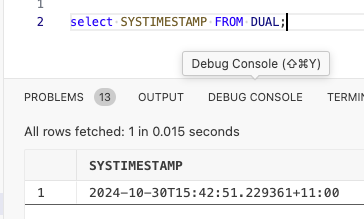
Table is defined as:
create table datetime_test ( rec_id number(10), note varchar(100), processed_date date);
An d a record is inserted as (in local time):
insert into datetime_test values(1,'note 1',to_date('30/10/2024 15:00','DD/MM/YYYY HH24:MI'));
Notice, the timestamp field has a DATE type.
When trying to extract the timestamp and convert it to a UTC timestamp in CloudHub the following result set is received:
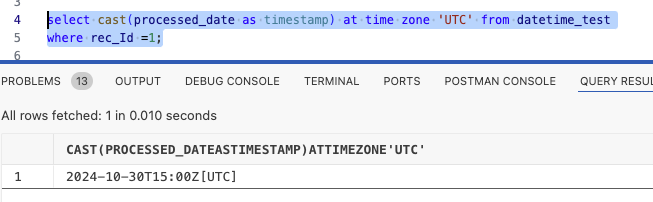
As you can see the time zone conversion is incorrect. It shows the same timestamp but adds the UTC timezone information.
A mule app with SELECT operation of the Database Connector will get the same result running in CloudHub.
Risoluzione
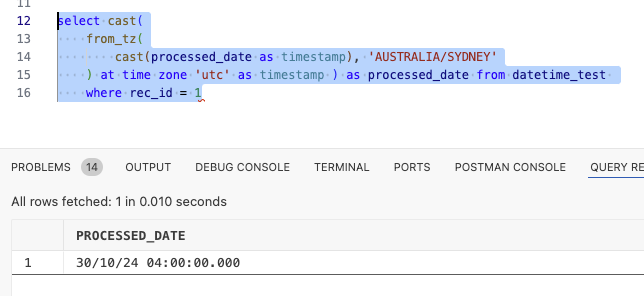
Use the following transformation in the SELECT statement:
select cast( from_tz( cast(processed_date as timestamp), 'AUSTRALIA/SYDNEY' ) at time zone 'UTC' as timestamp ) as processed_date from datetime_test where rec_id = 1;
Numero articolo Knowledge
003283033
Questo articolo ha risolto il problema?
Facci sapere, così possiamo migliorare!
