조직 선택
How to Split a Field by a Specific Character and Add Results as New Rows
게시 일자: Dec 22, 2025
과업
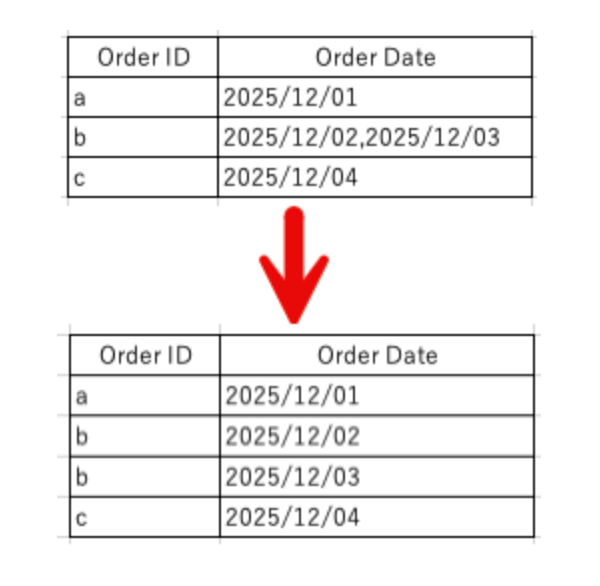
Transform input data containing a delimited string in a field (e.g., [Order Date]) into separate rows for each value. This method applies to any specific character or string, not limited to commas.
Example Transformation:
- Before: OrderID "b" with Order Date "2025/12/02, 2025/12/03"
- After: Two rows for OrderID "b" with "2025/12/02" and "2025/12/03" respectively.
단계
Follow these steps to split the field:
- Create a calculated field to extract the part to the left of the comma (e.g., retrieve "2025/12/02").
TRIM( SPLIT( [Order Date], ",", 1 ) ) - Create a calculated field to extract the part to the right of the comma (e.g., retrieve "2025/12/03").
TRIM( RIGHT([Order Date], if(FINDNTH([Order Date],",", 1) > 0) then LEN([Order Date]) - FINDNTH([Order Date],",", 1) - LEN(",") + 1 else 0 end) ) - Use the Pivot function to merge the columns created in steps 1 and 2.
- Retain only the merged column and the "OrderID" field.
추가 자원
For more information, see the attached sample flow "How_To_Split_And_Add_As_New_Rows.tflx".
Knowledge 기사 번호
003962197
이 기사를 통해 문제를 해결했습니까?
개선을 위한 의견을 보내주세요.
