Seleziona un'organizzazione
A2P 10DLC Campaign Guide
Data pubblicazione: Jun 10, 2026
Descrizione
NOTE: As of February 1, 2025 any unregistered traffic will be blocked by the carriers in the ecosystem. In order to send registered traffic you must create a brand and campaign and assign your phone number to a campaign.
A Guide to Completing Your A2P 10DLC Application
Welcome! This guide will walk you through completing your A2P 10DLC (Application-to-Person 10-Digit Long Code) campaign application. Mobile carriers (like Verizon, T-Mobile, and AT&T) require you to register your campaign to ensure reliable, high-throughput message delivery to your consumers in the U.S.
Please provide clear, accurate, and detailed information in each section below to facilitate a smooth mobile carrier review process and prevent delays.
Overview of the Application
This application is organized into several key sections, each gathering specific details required for carrier review:
-
Campaign & Content Attributes (links, age restrictions)
-
Campaign Overview (brand, purpose, use case, samples)
-
The Opt-in Process & Policies (verbatim flow, confirmation message, T&C/privacy URLs)
-
Required Help & Stop Commands (universal keywords and responses)
The Foundation: Explicit User Consent
Before you begin, please keep this core principle in mind: Explicit consent is a Carrier Requirement
Mobile carriers require that a consumer take a clear and intentional action to agree to receive your text messages. Consent cannot be implied, assumed, or required as a condition of purchase. A consumer knowingly say "yes", such as by:
-
Checking a box that is not pre-checked.
-
Texting a specific keyword to your number.
-
Giving clear, affirmative consent verbally to a live agent who is reading from a compliant script.
Following these best practices is key to creating a transparent and positive experience for your subscribers and is essential for campaign approval.
Define Before You Create
Before creating your message, please define the following details for your campaign. This will help ensure consistency across all messages.
-
Registered Brand: [Your Registered Brand Name]
-
Type of Notification: [Notification Type, e.g., Delivery Notifications]
-
Use Case: [Campaign Use Case, e.g., Account Notifications]
-
Opt-in Method: [How users opt-in, e.g., via a webform, verbally from an agent, by texting a keyword, by scanning a QR code]
Section 1: Campaign and Content Attributes
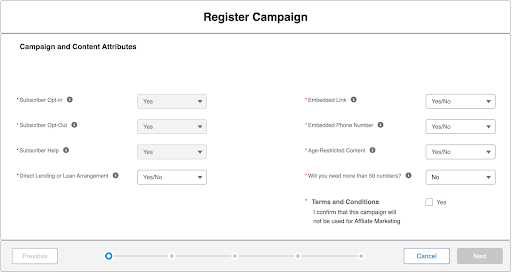
These message responses are pre-configured and cannot be changed. This is a carrier requirement from all mobile carriers (e.g., AT&T, Verizon, T-Mobile) to ensure a consistent experience for all mobile subscribers.
-
Subscriber Opt-In
-
Subscriber Opt-Out
-
Subscriber Help
Direct Lending or Loan Arrangement: Select 'YES' if your messages involve the offering, advertisement, or arrangement of loans. This includes, but is not limited to, payday loans, short-term credit, auto loans, and mortgage offers. Messaging in this category is considered a sensitive use case by mobile carriers and requires strict vetting for approval.
Embedded Link: Select 'YES' if your ongoing messages to subscribers will contain a URL.
Embedded Phone Number: Select 'YES' if your ongoing messages to subscribers will contain a phone number.
Age-Restricted Content: Select 'YES' if your messages will promote products or services that are legally restricted by age. Otherwise, select 'NO'.
Terms and Conditions: This is a required confirmation. Please confirm accuracy and check the box to proceed.
Section 2: Campaign Overview
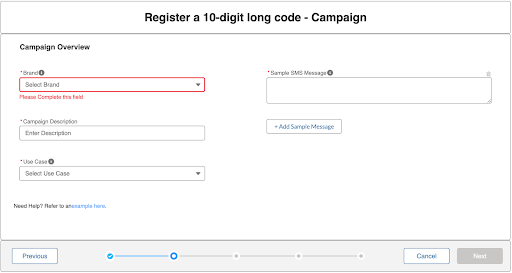
Brand Name: Enter the “Brand” name that was registered.
Campaign Description: Briefly describe this campaign’s purpose. Example: My “Brand” will send sms notifications for appointment reminders and updates.
Use Case: Select the category that best describes the messages you will send. Accuracy is critical for carrier approval. You will find detailed examples for each major use case in the "Sample Messages" section below.
-
2FA (Two-Factor Authentication): For sending one-time passcodes (OTPs) to users for secure account logins. This use case is strictly for security and not for any other type of message.
-
Account Notifications: For sending non-promotional alerts to users about their accounts. Examples: Security alerts, password resets, profile change notifications, or fraud warnings.
-
Customer Care: For engaging in two-way conversations to support consumers. Examples: Answering user questions, providing assistance, scheduling appointments, and resolving issues.
-
Marketing & Promotions: For sending promotional messages to drive engagement or sales. Examples: Sale announcements, coupons, new product information, and event invitations.
-
Political: For messages related to political campaigns, advocacy, or elections. Examples: Campaign fundraising, get-out-the-vote reminders, and supporter updates.
-
Public Service Announcement (PSA): For sending informational alerts relevant to a community. Examples: Emergency alerts (weather, safety), public health announcements, and community event notifications.
-
Transactional Notifications: For sending automated, non-promotional messages triggered by a specific action or event. Examples: Appointment reminders, order confirmations, shipping status updates, and delivery notifications.
-
Mixed Use Case: A campaign that combines two or more of the above use cases. Select this if you will be sending different types of messages from the same number. Example: Using one campaign to send both marketing promotions and transactional shipping notifications.
Sample SMS Message:
Provide at least two sample messages showing how you will use this campaign.
Instructions:
-
Provide a sample for each use case. If you're sending both marketing and alert messages, provide an example of each.
-
Include opt-out and HELP language. All messages include HELP and STOP keywords (e.g., "Reply HELP for help, STOP to cancel").
-
Show links/phone numbers if you use them. If your messages will contain hyperlinks or phone numbers, ensure your samples include them.
Common Examples:
-
Marketing: Sparks Retail Alerts: Flash sale! Get 20% off all online orders for the next 24 hours. Shop now: sparksretail.com/sale. Reply HELP for help, STOP to cancel.
-
Consumer Care: Sparks Support Alerts: We've received your support request, and a team member will text you back from this number shortly. Reply HELP for help, STOP to cancel.
-
Account Notifications: "Sparks Bank: We have detected suspicious activity on your account. Please call our fraud department immediately at 1-888-555-5555 to verify recent transactions. Reply HELP for help, STOP to cancel.
-
Delivery Notifications: Sparks Hardware: Good news! Your order #SH12345 is out for delivery and should arrive today. Reply HELP for help, STOP to cancel.
Section 3: Opt-in Information
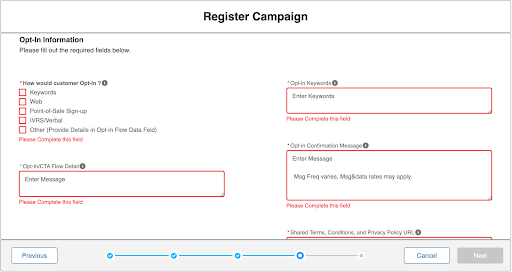
How will consumers opt-in?
Call to Action and Call to Action / Message Flow:
There are two portions of the Call to Action review when it comes to vetting for 10DLC.
First, when preparing your Opt-In/Call to Action, the vetting aggregator will review the actual Call-to-Action disclosure shared with the consumer/recipient during the opt-in collection. This disclosure is the language provided to the consumer/recipient informing them that they are opting in.
Examples of how to get users to opt in:
-
Entering a phone number on a website
-
Clicking a button on a mobile webpage
-
Sending a message from the consumer’s mobile device that contains a keyword
-
Opting in over the phone with a live agent or IVR technology
Call-to-Action to include:
-
Registered Brand name
-
Types of messages being sent
-
Message frequency disclosure (e.g., Msg frequency varies, 2/msgs per week, etc.)
-
"Message and data rates may apply" disclosure
-
HELP information (e.g., text HELP for help)
-
STOP/opt-out information (e.g., text STOP to stop)
-
Link to the Privacy Policy and Terms & Conditions
Here are some examples of different types of opt-in for illustrative purposes:
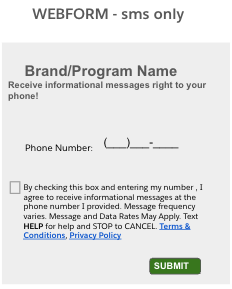
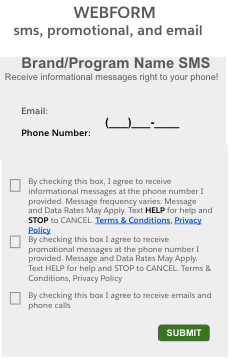
Website/Online opt-in: "By submitting this form and signing up for texts, you consent to receive marketing text messages (e.g. promos, cart reminders) from [Company Name] at the number provided, including messages sent by autodialer. Consent is not a condition of purchase. Msg & data rates may apply. Msg frequency varies. Unsubscribe at any time by replying STOP or clicking the unsubscribe link (where available). Reply HELP for help. Privacy Policy [link] & Terms [link]."
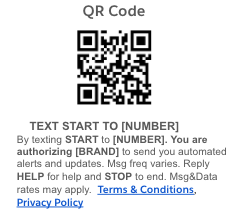
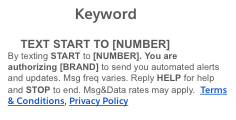
Keyword Opt-in: "By texting START to [phone number], you consent to receive marketing text messages from [Company Name]. Consent is not a condition of purchase. Msg & data rates may apply. Msg frequency varies. Unsubscribe at any time by replying STOP or clicking the unsubscribe link (where available). Reply HELP for help. Privacy Policy [link] & Terms [link]."
Important: You will need to explain how the consumer/recipient is informed to text the keyword/initiate the text messaging conversation. Acceptable explanations of how the consumer is informed include:
-
a link to a webpage where the keyword opt-in is advertised
-
An attached screenshot of the keyword opt-in advertisement
Consumer-Initiated Messaging: "By starting a text conversation with [Company Name] by texting [phone number] you are agreeing to receive conversational messages from [Company Name]. Msg & data rates may apply. Msg frequency varies. Unsubscribe at any time by replying STOP or clicking the unsubscribe link (where available). Reply HELP for help. Privacy Policy [link] & Terms [link]."
Verbal opt-in: "[Company name] will be collecting opt-in verbally from their consumers. Consumers will be able to opt in to receive messages either in person at their physical location or via a phone call if they initiate the call. When a consumer is registered for the first time, they are asked to provide their phone number, and staff are trained to ask if the consumer would like to opt in to SMS-based billing notifications. They will be verbally informed that ‘Message and data rates may apply’, ‘Message frequency may vary’, and they can ‘text HELP for support or more information and STOP to unsubscribe at any time.’ They will also be informed that their phone number will not be shared with third parties for marketing or promotional purposes. Privacy Policy and Terms & Conditions links are added to the Call to Action or Message Flow.”
Call to Actions - Carrier Ready Checklist
Before you submit, review your call to action - the Carriers require these details be included.
[ ] Registered Brand Name (e.g., "ABC Company")
[ ] Types of Notifications (e.g., "to receive delivery notifications," "for marketing alerts")
[ ] Message Frequency (e.g., "Message frequency varies," "1 message/week")
[ ] Message Costs: (e.g., "Message and data rates may apply")
[ ] HELP and STOP Instructions (e.g., "Reply HELP for help and STOP to cancel")
[ ] Terms & Conditions URL and Privacy Policy URL
Opt-in/CTA Flow Detail:
Second, the vetting aggregator will review the Call to Action/Message Flow field in the campaign registration. In this section, the aggregators are looking for a clear and concise description of how an end user signs up to receive messages. This section requires a description of your opt-in process.
Here are a few examples of a description of an opt-in:
Example 1:Call to Action/Message Flow - Web Form
consumers opt-in via a web form on our checkout page at www.sparkshardware.com/checkout.
Example 2: Call to Action/Message Flow - Verbal Script
Consumers opt-in verbally when calling to book an appointment. Our service agents read from the following required script: 'We can also send you appointment reminders via text message. By enrolling, you agree to receive automated reminders from Sparks Auto Care and accept our terms, which you can find at sparksauto.com/terms. You'll receive 1-2 messages per appointment. Message and data rates may apply. You can reply HELP for help or STOP to cancel anytime. Would you like to enroll?
Example 3: Call to Action/Message Flow - Keyword displayed on a Webpage
Consumers opt-in by texting the keyword DEALS to our number. We advertise this on our website at: www.sparkshardware.com/
Opt in Keywords: An opt-in keyword is the specific word a consumer texts to your number to subscribe to your messages. In the field below, please list all keywords you will use, including standard ones (START, JOIN, YES) and any custom ones (e.g., DEALS, ALERTS)
Opt in Confirmation Message: This is the first message a consumer receives immediately after they opt in to your campaign. This message is required by mobile carriers to confirm the consumer's consent.
Your confirmation message to include:
-
Registered Brand Name
-
Notification Types (e.g., "Marketing Alerts," "Delivery Notifications")
-
Message frequency disclosure (e.g., "Msg freq varies")
-
Message Costs (e.g., "Message and data rates may apply")
-
Instructions for getting help (e.g., "Reply HELP for help")
-
Instructions for opting out (e.g., "Reply STOP to cancel")
Example of a Carrier Ready Confirmation Message: "Welcome to Sparks Auto Care reminders! Msg freq varies. Msg & data rates may apply. Reply HELP for help, STOP to cancel."
Why this is a good example:
-
Brand Name: "Sparks Auto Care"
-
Purpose: "reminders"
-
Frequency: "Msg freq varies"
-
Rates Disclosure: "Msg & data rates may apply"
-
Help/Stop Keywords: "Reply HELP for help, STOP to cancel"
Shared Terms and Conditions and Privacy Policy URLs: Terms & Conditions and Privacy Policy URLs
Terms & Conditions and Privacy Policy
In the field below, enter the direct public URLs for your Terms & Conditions and your Privacy Policy, separated by a comma.
To ensure your campaign meets mobile carrier requirements for approval, first use the checklists below to confirm your pages meet Carrier requirements.
Terms & Conditions Requirements: Carriers require a set of dedicated Terms & Conditions for your SMS Program. Carriers require the following information be included:
-
Registered Brand Name
-
Types of messages being sent
-
Message Frequency disclosure (e.g., "Message frequency varies")
-
Message Costs (e.g, "Message and data rates may apply")
-
HELP information (e.g., text HELP for help)
-
STOP/ opt-out information (e.g., text STOP to stop)
-
A direct link to your Privacy Policy
"Messaging Terms & Conditions + (Registered Brand Name and Types of Notifications)”
You agree to receive informational messages (appointment reminders, account notifications, etc.) from [Company Name]. Message frequency varies. Message and data rates may apply. For help, reply HELP or email us at [email address]. You can opt out at any time by replying STOP."
Privacy Policy Requirement
If your policy mentions sharing consumer data with any third parties, the Carriers request a statement be included that identifies that mobile information will not be shared or sold to third parties for marketing and promotional purposes. This relates to the requirement that businesses obtain express consent for marketing; therefore, sharing such data for marketing or promotional purposes is prohibited.
Examples:
-
"No mobile information will be sold or shared with third parties/affiliates for marketing/promotional purposes."
-
“No sms mobile data will be sold or shared with third parties/affiliates for marketing/promotional purposes."
Section 4: Opt-Out and HELP Information
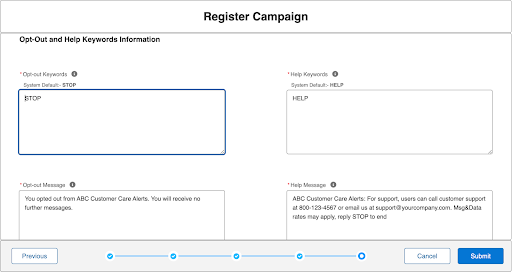
Opt-out Keywords: List all keywords consumers can text to unsubscribe from your messages. STOP is a universal keyword required by all mobile carriers.
Example: STOP,CANCEL,UNSUBSCRIBE,END,QUIT
-
Registered Brand Name
-
Confirm that the user has successfully opted out
-
Statement that no further messages will be sent.
-
Example of an Opt-out Message: Sparks Apparel Alerts: You have successfully unsubscribed and will receive no further messages from us.
Opt-out Message: This is the final confirmation message a consumer receives after texting an opt-out keyword (like STOP). It is mandatory and confirms that the subscription has been canceled.
Why this is a good example:
-
Registered Brand Name: "Sparks Apparel”
-
Types of notifications: “Alerts"
-
Confirms Opt-out: "You have successfully unsubscribed."
-
Confirms No Further Messages: "...and will receive no further messages from us."
Help Keywords: Enter the keyword consumers will text to receive help information. HELP is a universal keyword required by all Mobile Carriers.
Help Message: This is the automated response a consumer receives after texting HELP
HELP Message to Include:
-
Registered Brand Name
-
One method for contacting support (e.g., a phone number, email address, or support website).
-
Instructions on how to opt out (e.g., "Reply STOP to cancel").
-
The "Message and data rates may apply" disclosure.
Subscriber HELP Message Example:Sparks Auto Care Reminders: For support, please call 1-888-555-5555 Msg & data rates may apply. Reply STOP to cancel.
Why this is a good example:
-
Registered Brand Name: "Sparks Auto”
-
Types of Notifications: “Care Reminders"
-
One Support Methods: Provides a phone number
-
Opt-out Instruction: "Reply STOP to cancel."
-
Rates Disclosure: "Msg & data rates may apply."
Call to Action Examples
The following screenshots show examples of compliant Call to Action disclosures for website opt-in, keyword opt-in, and verbal opt-in methods:
Risoluzione
To complete your A2P 10DLC campaign application:
(1) Define your Campaign & Content Attributes including opt-in/opt-out toggles and age restrictions.
(2) Complete the Campaign Overview with brand name, use case description, and at least two sample messages that include HELP and STOP language.
(3) Document your Opt-in Process with a verbatim Call to Action that includes brand name, message types, frequency, 'Msg & data rates may apply', HELP and STOP instructions, and links to your Terms & Conditions and Privacy Policy.
(4) Confirm your Opt-Out and HELP keyword responses meet carrier requirements.
Numero articolo Knowledge
003962215
Questo articolo ha risolto il problema?
Facci sapere, così possiamo migliorare!
