Velg en organisasjon
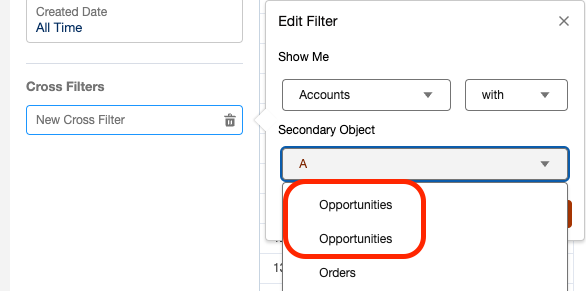
Duplicate Object Names Displayed in Report Cross Filter Secondary Object
Publiseringsdato: Aug 18, 2026
Beskrivelse
The secondary object in a Salesforce report's cross filter displays the Related List Label of the child object's target field.
If two child objects share the same Related List Label on their target fields, both objects will display with identical names in the secondary object dropdown of the report's cross filter — making it hard to tell them apart.
Løsning
This article explains how to fix duplicate object names appearing in the secondary object dropdown of a report's cross filter.
How to Fix It
To resolve this, rename the Related List Label on the child object's target field:
- Navigate to Setup.
- Open Object Manager.
- Select the target object.
- Go to Fields and Relationships.
- Click the target field.
- Select Edit.
- Update the Related List Label.
Flere ressurser
Knowledge-artikkelnummer
003962390
Hjalp denne artikkelen med å løse problemet ditt?
La oss få vite det slik at vi kan forbedre!
