Valitse organisaatio
"Best Match" Sort Rule Missing from Sort Rules
Julkaisupäivä: Sep 30, 2025
Kuvaus
Problem Statement
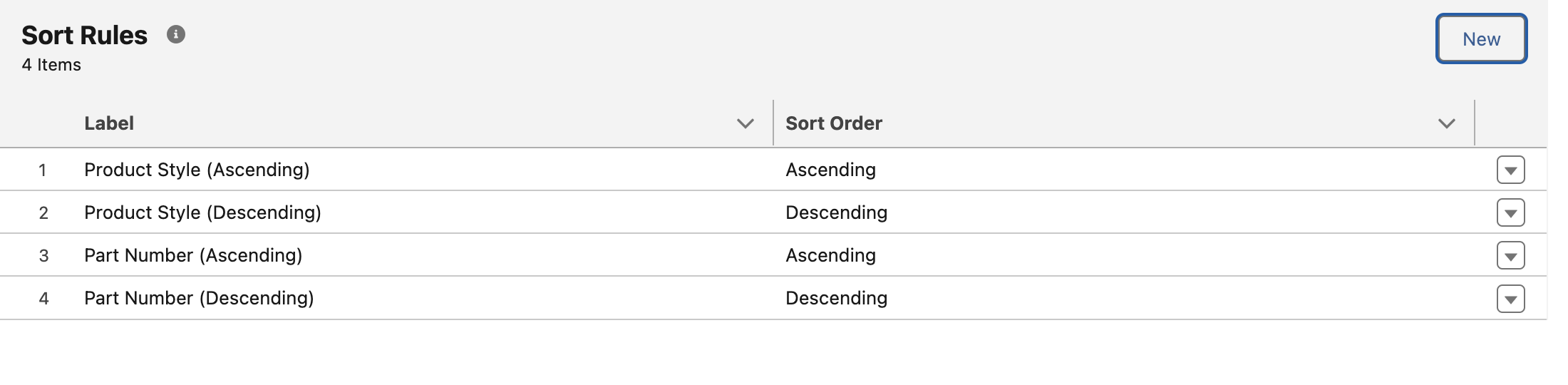
Certain scenarios can cause the "Best Results" Sort Rule to be missing from the Sort Rules in Commerce Search. The most common scenario is customer updates their sort rules outside of the UI, for example using Sort Rules Connect API endpoint will automatically replace ALL sort rules, so if best match is not included, it will be deleted.
Confirming Error
- In the UI Navigate to Storefront -> Search -> Sort Rules
- Notice "Best Match" Missing from Sort Rules
- Also notice we cannot add "Best Match" back via UI
- Notice "Best Match" Missing from Sort Rules
Ratkaisu
This can easily be fixed using the Commerce Management Webstore Search, Sort Rules Connect REST API endpoint.
- Navigate to Workbench
- Example request URL:
/commerce/management/webstores/webstoreId/search/sort-rules - Execute the above endpoint as a PUT request using the following body
- Example request URL:
{
  "sortRules" : [
    {
      "type" : "Relevancy",
      "direction" : "Default",
      "sortOrder" : 1
    }
  ]
}
Note:
- Doing this will remove existing results filters, they'll need to be added as a part of PUT body above, or added back manually after executing the above.
- A full re-index of Search will be needed for this to take effect.
- If you are using this endpoint to update sort rules, you'll need to continue including all desired sort rules as PUT operation here deletes all existing sort rules.
Knowledge-artikkelin numero
003964514
Ratkaisiko tämä artikkeli ongelmasi?
Anna palautetta, jotta voimme kehittyä!
