組織を選択
レコード作成時に共有ルールでレコードを共有するユーザーに、Catter 投稿でメンションする方法
公開日: Aug 25, 2025
説明
レコード作成時に起動するレコードトリガーフローでChatter投稿を行うと、メンションがグレーアウトする場合があります。
これは、組織の共有設定でオブジェクトが「非公開」となっており、共有ルールでアクセス権を与えている場合に発生します。
Salesforceの処理順序では、レコードトリガーフローの処理の後に共有ルールの評価が行われます。
このため、非同期パスを利用して、共有ルールでレコードが共有された後にフローが実行されるようにする必要があります。
下記のシナリオを例にChatter投稿を実行するフローサンプルを紹介します。
▼シナリオ
前提: 組織の共有設定で対象のオブジェクトが「非公開」と設定されており、共有ルールでアクセス権を付与している
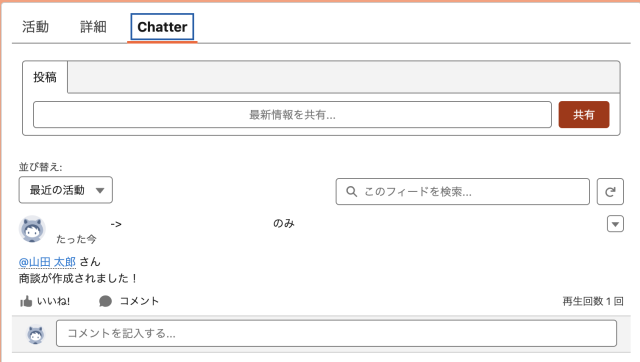
商談レコードの作成時に、商談レコードのフィードにChatter投稿で取引先の所有者をメンションし、レコードが作成されたことを通知します。
※ 注意
- こちらの記載内容についての具体的な手順に関しては、Salesforce サポートでは対応できかねますので、あらかじめご了承ください。
- お客様で構築しても期待通りの動作にならない場合は、Salesforce サポートに問い合わせてください。
解決策
- [設定] で、[クイック検索] ボックスに「フロー」と入力して、[フロー] を選択します。
- [新規フロー] を選択します。
- [最初から開始] を選択します。
- [レコードトリガーフロー] を選択して [作成] を選択します。
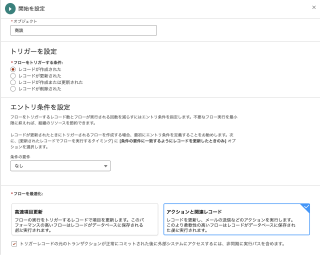
- 開始要素で、フローの起動条件を設定します。
[オブジェクト]: 商談
[フローをトリガーする条件]: レコードが作成された
[条件の要件]: なし
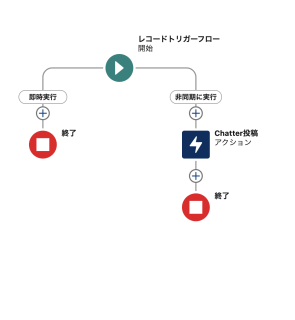
[トリガーレコードの元のトランザクションが正常にコミットされた後に外部システムにアクセスするには、非同期に実行パスを含めます。]: True - [非同期に実行] の下の [+] をクリックして [アクション] を選択します。
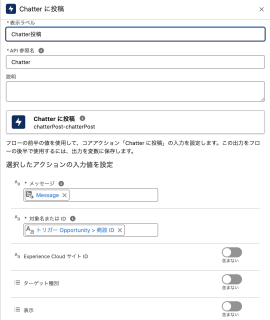
- [Chatterに投稿] アクションを選択し、追加します。
- [Chatterに投稿] アクションの表示ラベル、API参照名を入力します。
[表示ラベル]: ※任意 (例) Chatter投稿
[API参照名]: ※任意 (例) Chatter - [Chatterに投稿] アクションの入力値を設定します。
[メッセージ]: ※テキストテンプレートリソースを使用してメッセージ内容を用意します。詳細は下記に記載します。
[対象名または ID]: {!$Record.Id} - [保存] をクリックします。
- 下記を設定して [保存] をクリックします。
フローの表示ラベル : 作成したレコードにChatterを投稿する
フローの API 参照名 : ChatterPost - [有効化] をクリックします。
○テキストテンプレートを使用してChatterのメッセージ内容を用意する
1. フロー左上のツールボックスを選択
2. [新規リソース] を選択し、リソース種別に [テキストテンプレート] を選択
3. API参照名を設定
[API参照名]: ※任意 (例) Message
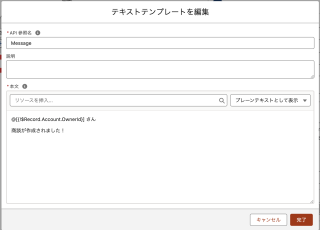
4. [リソースを挿入...] より、フローをトリガーした商談情報や取得した取引先責任者情報を差し込み項目として使用し、[本文] の内容を作成注意事項 : テキストテンプレートを利用する場合は、「プレーンテキストとして表示」に変更してください。
・ユーザーにメンションする場合: @[UserId]
(例)
・ユーザーグループにメンションする場合: @[CollaborationGroupId]
・レコードの URL を送信する場合: https://MyDomain.lightning.force.com/{!$Record.Id}/view
@[{!$Record.Account.OwnerId}] さん
商談が作成されました!
ナレッジ記事番号
004259633
この記事で問題は解決されましたか?
ご意見をお待ちしております。
