Seleziona un'organizzazione
Salesforce Assistance with Digital Operational Resilience Act (DORA) Incidents
Data pubblicazione: Sep 30, 2025
Descrizione
What is DORA?
The Digital Operational Resilience Act (DORA) is a European Union regulation ((EU) 2022/2554) that mandates financial entities to enhance their digital operational resilience. Effective from January 17, 2025, DORA applies to Financial Entities and their global third-party service providers.
Salesforce Assistance for DORA-Related Incidents
Under DORA, financial institutions must address incidents affecting availability, authenticity, integrity, or confidentiality. These institutions are also required to ensure they can obtain assistance from their service providers for incidents related to external services.
-
Customer-Owned Incidents: If an incident occurs on the customer's side of the shared responsibility model, it is considered a "Customer-Owned" incident. Salesforce provides assistance to DORA customers to help them address such incidents.
-
Customers with Premier and Signature Success Plans receive this assistance for Security incidents at no additional cost.
-
Customers with the Standard Success Plan can access assistance for a fee of $25,000 USD per security incident. Non-Security related incidents assistance is provided at no additional cost.
-
This assistance is designed to support customers in maintaining compliance with DORA regulations.
-
-
Salesforce-Owned Incidents: If an incident occurs on Salesforce's side of the shared responsibility model, Salesforce will provide assistance as usual.
Risoluzione
How to Request Salesforce Assistance for a DORA Incident
Note: Currently, support intake for DORA-related incidents is not available via Chat and Voice. Depending on your success plan, please use Ask Agentforce or the “Create Case” option on the H&T portal to create a ticket with us.
Steps to Request Assistance:
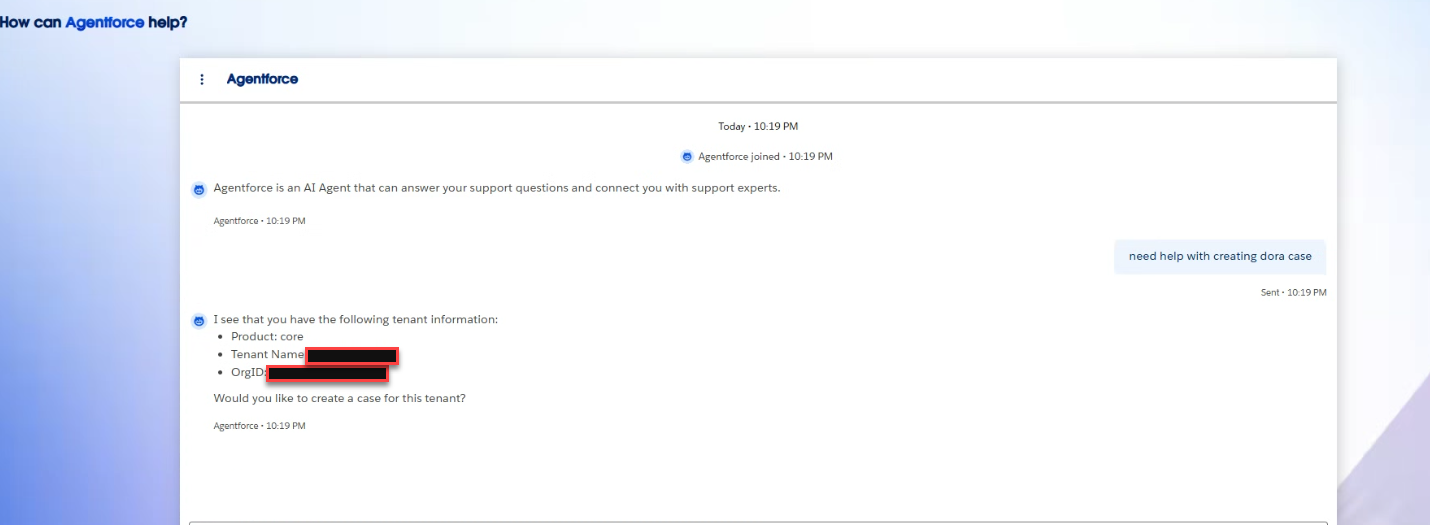
Create a DORA case via Agentforce
- There are 2 ways to connect with Agentforce on Salesforce Help:
- From any Salesforce Help page, click Ask Agentforce
- Full Screen Interface - From Salesforce Help homepage, click the text field below "How can Agentforce help?"
- In the Agentforce screen, enter your question or describe your DORA related issue.
- Follow the guidance from Agentforce (you may be asked for additional details before connecting you with a human).
Create a DORA case (using 'Create Case') if you have opted out of Agentforce experience
-
Log in to the Salesforce Help and Training (H&T) portal.
-
Navigate to ‘My Cases’.
-
Select ‘Create Case’.
-
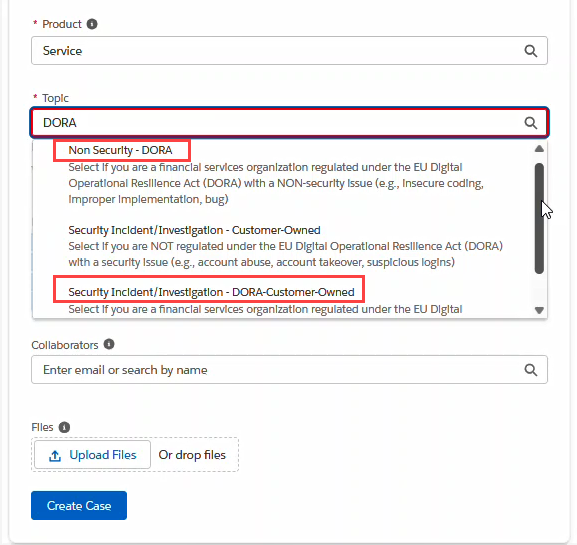
Choose the most relevant topic from the list below when opening a new case for a DORA incident:
-
Security Incident/Investigation - DORA Customer Owned
Select this option for incidents such as:-
BOT attack on Web Forms
-
Account Abuse
-
Account Takeover
-
Other similar security-related incidents
-
-
Non-Security - DORA Incidents
Select this option for incidents such as:-
URL Redirection
-
Configuring Allowlist
-
Content Delivery Network (CDN) Issues
-
Testing Profile Modifications
-
Integration Issues/Third-Party API Concerns
-
Partner Profile Modifications & Other Partner Issues
-
IP Location Questions
-
Installing User Access Report App
-
Insecure Coding
-
Improper Implementation
-
Freezing/Unfreezing Accounts
-
Testing & Troubleshooting
-
-
For further details, please refer to the DORA FAQs available on the H&T portal.
Numero articolo Knowledge
004260856
Questo articolo ha risolto il problema?
Facci sapere, così possiamo migliorare!
