Выбрать организацию
Lookup Fields are not available for mapping in the Data Import Wizard
Дата публикации: Sep 24, 2026
Описание
The Data Import Wizard uses page layouts and field-level security to determine the fields available on import.
In order for a field to be visible within the Data Import Wizard, it must be available to the user within the associated page layout and field-level security. This applies to end users as well as users with a System Administrator profile.
Решение
This article explains how to resolve the issue of fields not being available for mapping in the Data Import Wizard, including custom lookup fields.
Check Field Access, Layout, and Security
If users report that fields are no longer available for mapping in the Data Import Wizard, ensure that the affected user has access to the missing fields.
- Field Access: Confirm the affected user has access to the missing fields.
- Profile and Record Type: Ensure the user's profile has at least one assigned record type, and the corresponding page layout includes the missing fields.
- Field-Level Security: If the fields are on the page layout, double-check the user's profile's field-level security settings. Verify they have access to the field. You can review field access by field, profile, or record type in Setup by searching for "Field Accessibility."
Custom Master-Detail and Lookup Relationships
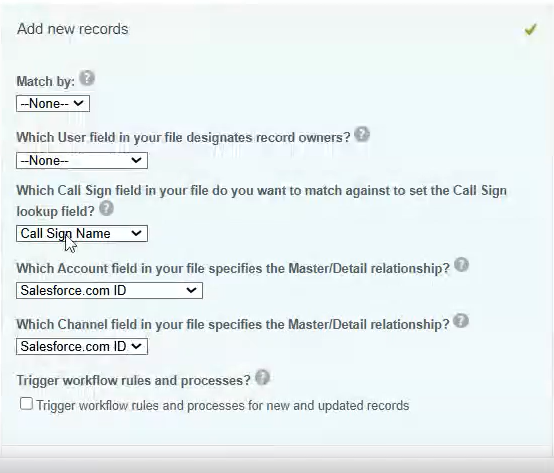
Custom Master-Detail and Lookup relationships are fundamentally similar, except Master-Detail fields are always required, while Lookups are optional. The screenshot below shows a custom object import with a custom lookup field. During import, Standard lookups can be matched using either the Salesforce record ID or the record name. Ensure this same flexibility (matching by ID or name) is available for custom lookup fields as well.
Дополнительные ресурсы
Номер статьи базы знаний
004333175
Эта статья решила вашу проблему?
Оставьте свой отзыв, чтобы мы могли стать лучше!
