Vælg en organisation
Disable First Party Use of Salesforce Cookies Setting for Salesforce Voice Customers
Udgivelsesdato: Jun 17, 2026
Beskrivelse
Salesforce Voice (formerly Service Cloud Voice) with Amazon Connect and Salesforce Voice with Partner Telephony from Amazon Connect are not compatible with the My Domain setting "Require first-party use of Salesforce cookies." As part of the Spring '25 release (254), this setting must be disabled for these Salesforce Voice models to ensure Single Sign-On (SSO) login works correctly for agents and Salesforce admins. SSO (Single Sign-On) is the process that allows users to authenticate once and access Salesforce without re-entering credentials. If this setting is not disabled, SSO login may fail for Salesforce Voice users.
Løsning
To ensure SSO login works as expected for Salesforce Voice agents using Amazon Connect or Partner Telephony from Amazon Connect, a Salesforce admin must disable the "Require first-party use of Salesforce cookies" setting in My Domain Routing and Policies. Follow the steps below.
Update My Domain Routing and Policies
- From Setup, in the Quick Find box, enter My Domain, and then select My Domain.
- Under Routing and Policies, click Edit.
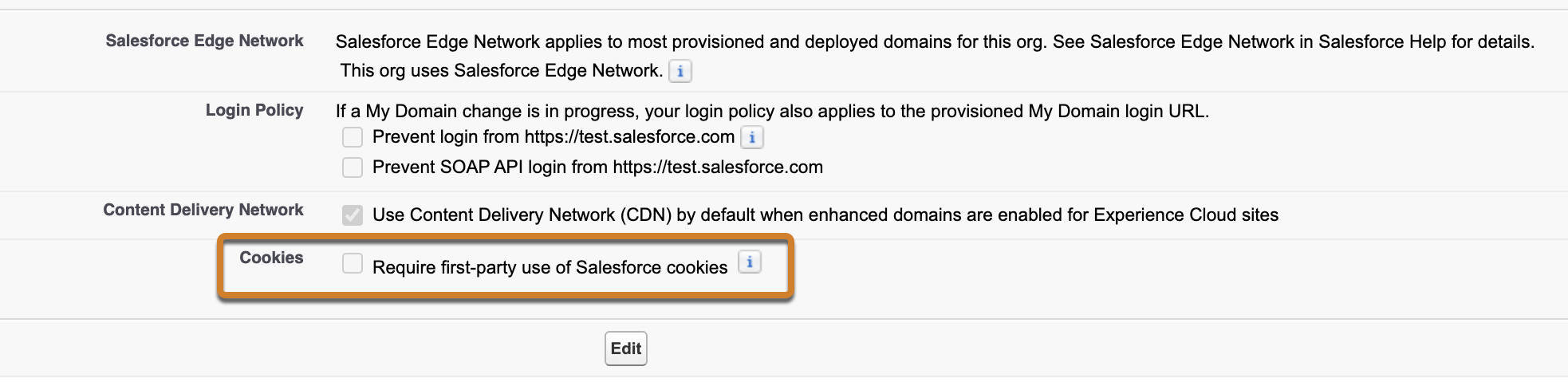
- Disable Require first-party use of Salesforce cookies.
- Save your work.
Screenshot: My Domain Routing and Policies settings page with the "Require first-party use of Salesforce cookies" checkbox highlighted in the Routing and Policies section.
Log Out and Log In
After saving the changes, the Salesforce admin and all Service representatives must log out of Salesforce and log back in to ensure the changes take effect.
Vidensartikelnummer
004333227
Løste denne artikel dit problem?
Giv os besked, så vi kan forbedre os!
