Выбрать организацию
Cookie manager is shared among all the http requests in a mule application if they have same http configuration.
Дата публикации: Feb 28, 2025
Описание
In a Mule application, each request configuration is associated with a single CookieManager, which is responsible for managing and storing cookies. This CookieManager is shared across all requests using the same request configuration rather than being instantiated per event. As a result, if multiple events overlap at a given point in time, the cookies may be overwritten due to concurrent access.
Example Scenario:
Consider a Mule application with three HTTP request connectors that send requests to an external web API. All three HTTP requests share the same HTTP configuration, meaning they connect to the same port number.
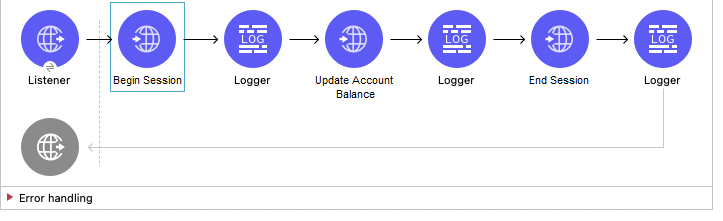
Now, suppose there are three concurrent threads flowing through this application:
- When the first request thread reaches the external web API via the first HTTP request connector, a cookie is assigned by the web API and is received as a response header.
- Similarly, for the other two request threads, two distinct cookies are assigned by the external web API.
- Since all three requests share the same HTTP configuration, they also share the same CookieManager. As a result, the cookie values from previous threads will be overwritten by the most recently received cookie value from the external web API.
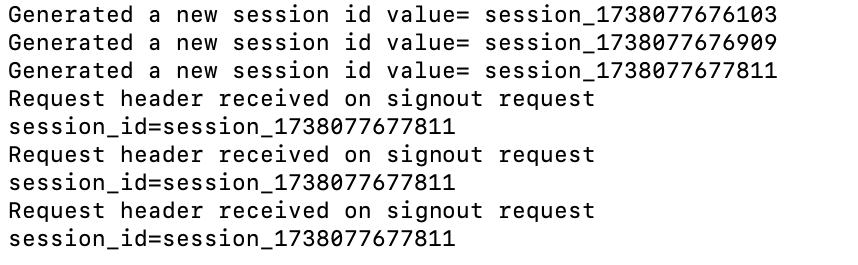
This behavior can be observed in the output log:
- "Generated a new session ID value" represents the session cookie values assigned to the three threads separately.
- "Request header received on signout request" shows that all three threads have the same session cookie, which corresponds to the last received cookie.
Workaround for Cookie Overwriting Issue
In scenarios where cookie overwriting causes issues, a viable workaround is to use dynamic configuration. This approach ensures that each thread is assigned a distinct HTTP configuration, preventing conflicts.
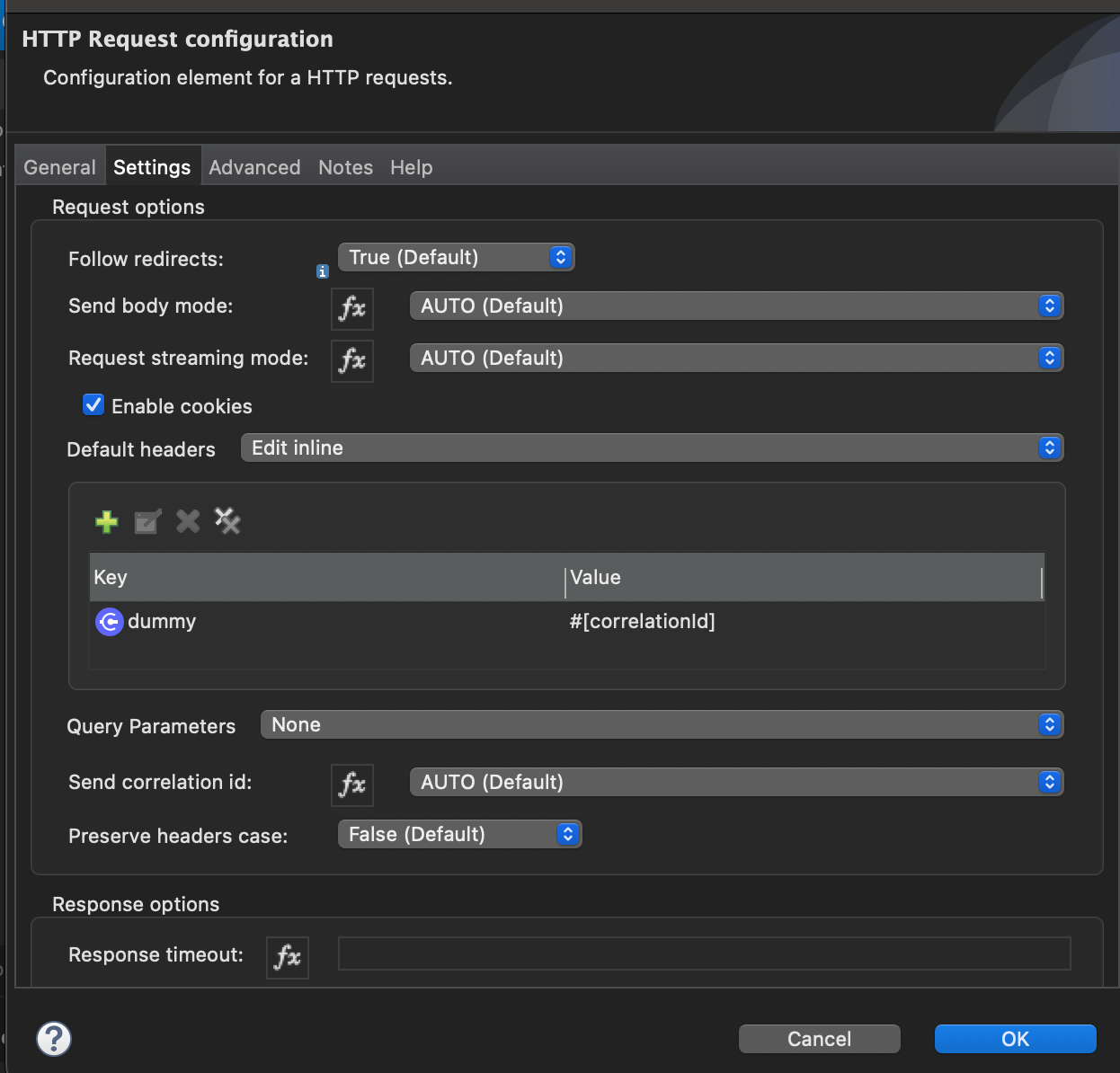
To implement this, you can assign default headers in the HTTP Request Connector. For example, you can set the CorrelationId received in the request headers as a key-value pair in the default headers.
For example :
The CorrelationId from the request headers can be dynamically assigned as a unique identifier for the HTTP configuration. This helps in isolating requests, ensuring that cookies do not interfere with concurrent threads.
For more details, refer to the official MuleSoft documentation:
https://docs.mulesoft.com/mule-sdk/latest/static-dynamic-configs#dynamic-configuration-lifecycle
Considerations & Risks
While dynamic configuration helps mitigate cookie overwriting issues, it comes with certain risks:
Increased Memory Usage:
-
- Generating a large number of dynamic configurations within a short period can lead to high memory consumption.
- Proper memory management and cleanup strategies should be in place.
Time-to-Live (TTL) Considerations:
- If the configurations are created and discarded within a very short timeframe, the TTL mechanism might not take effect efficiently.
Using dynamic configuration is an effective workaround for cookie overwriting issues. However, it should be implemented carefully, considering memory management strategies to avoid excessive resource consumption.
Номер статьи базы знаний
004333410
Эта статья решила вашу проблему?
Оставьте свой отзыв, чтобы мы могли стать лучше!
