Välj en organisation
Facing “ENTITY_IS_DELETED:entity is deleted” Error while bulk deleting archived/non archived Event records permanently from the Org
Publiceringsdatum: Sep 4, 2025
Beskrivning
When a user tries to bulk delete records via Data Loader, Workbench, or any API-accessible tools, they may encounter the error “ENTITY_IS_DELETED: entity is deleted.” This article explains how to resolve the issue and delete the records successfully.
To perform a bulk delete operation and permanently remove records from the Org, the user must have the “Bulk API Hard Delete” permission.
Even when a user is a System Administrator with all necessary permissions, the entire batch may be flagged as 'Entity is deleted' during a bulk delete. This makes it difficult to identify the specific record causing the error. This issue typically occurs when the batch size exceeds one. For example, if a user sets a batch size of 200, one problematic record may cause the entire batch to fail.
This issue arises when attempting to delete a record that is already deleted in the Org. For instance, if a user needs to remove unwanted data and notices that old event records are consuming storage space, they may attempt a bulk delete operation.
Cause of the error/failure
In the above scenario, a user may encounter the error message. When there are many event records to delete, recurring event records are likely present, including parent and child records. The image below illustrates that parent records are deleted successfully, while only child records face the error. When the batch processes the child record after the parent record, the child is already deleted in the system, resulting in the error ENTITY_IS_DELETED: entity is deleted.
If the parent event is listed before the child events, deleting the parent event will also delete the child events. Therefore, when the batch processes child event record IDs after deleting the parent event, it is expected to see an error indicating that the entity is not found or already deleted, as those child events were deleted along with the parent event.
Lösning
To resolve this issue, locate the record that is causing the issue from the batch you are attempting to delete.
For testing, as an sample, export 100-500 Archived Event Record IDs and follow the steps below.
Set the batch size in the Data Loader to 1. (Note: Set the Batch Size to 1 in any API tool used for bulk delete operations.)
1. Go to Settings.
2. Change Batch Size to "1."
3. Click OK.
By setting the batch size to 1, Data Loader processes each record individually. It will fail for the problematic record but continue processing the others.
When this operation is performed, you may see a result similar to the image below in the error message results.
If you encounter a similar pattern of error, use the following query in any API tool:
SELECT id, IsChild FROM Event WHERE IsArchived = true LIMIT 500 (for archived records)
SELECT id, IsChild FROM Event WHERE IsArchived = false LIMIT 500 (for non-archived records)
Then, perform the bulk delete operation with a batch size of 1. You may notice a pattern in the error logs or message.
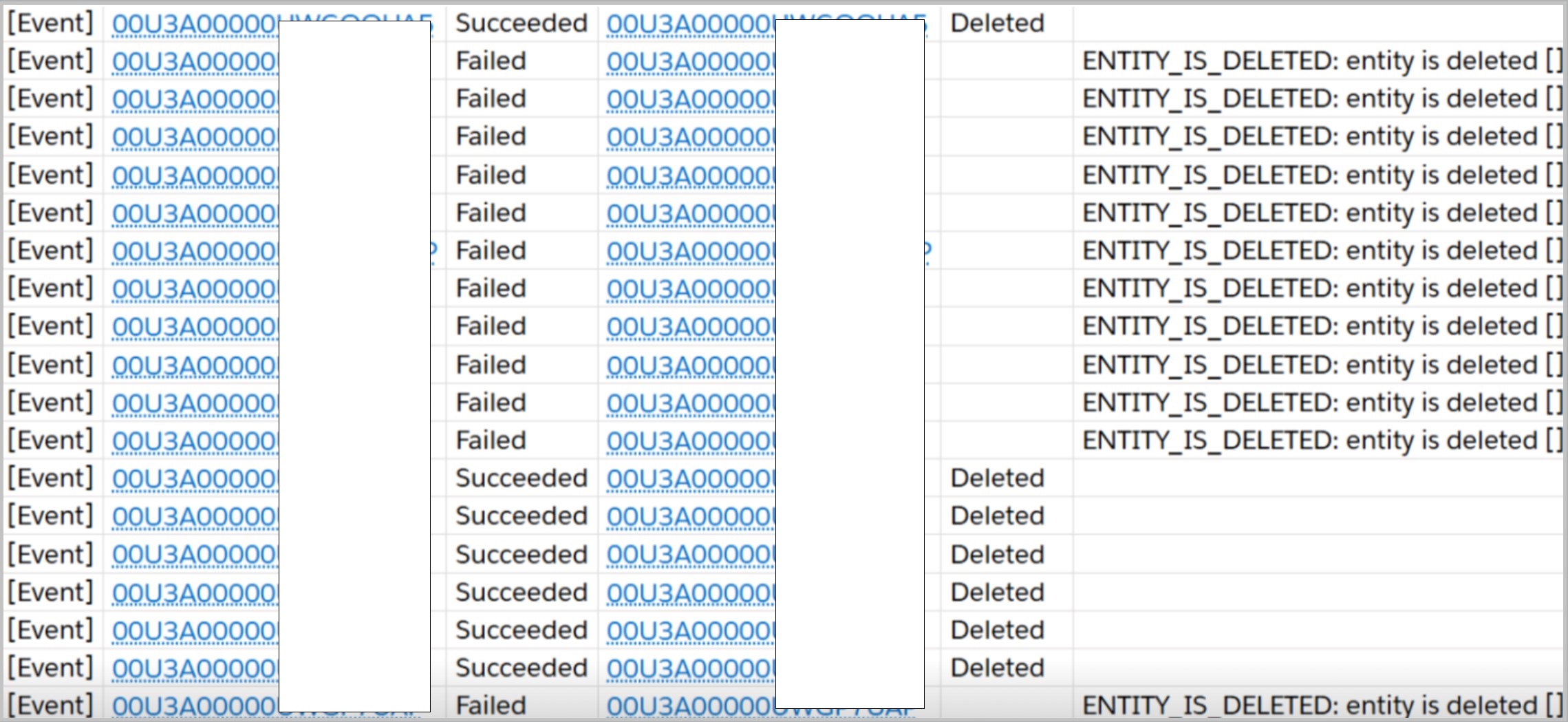
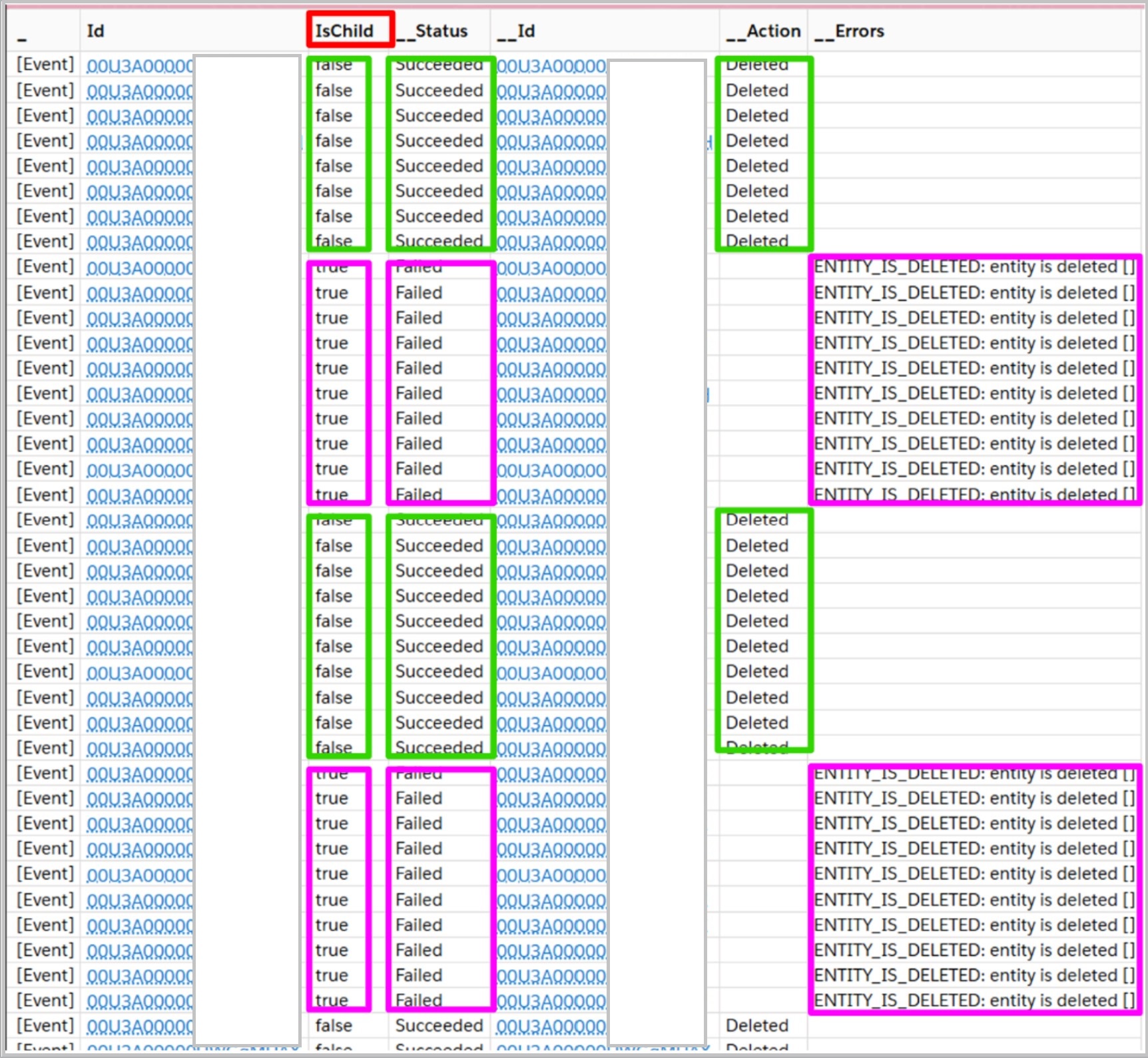
The results indicate that the issue occurs only for child records that have already been deleted, along with the parent record that appears before the child record in the list.
Therefore, you can ignore this error during the delete operation when the Batch size is set to 1 in the API tool where you're performing the delete operation.
Ytterligare resurser
1. In this scenario, you need to filter out the child event records (IsChild = false) and delete only the parent records. When the parent events are deleted, it will also delete the child events along with them. In this scenario, you can keep the possible batch size as per your requirement.
SELECT id, IsChild FROM Event WHERE IsArchived = true AND IsChild = false (if you are trying to delete archived records)
SELECT id, IsChild FROM Event WHERE IsArchived = false AND IsChild = false (if you are trying to delete non-archived records)
2. Otherwise, you can change the batch size to 1 and ignore the error message for child event records, as the child events will have already been deleted along with the parent event records. However, when you need to delete many records, a batch size of 1 will impact performance. It will take a long duration. A batch size of 1 is not recommended for a larger set of records. (Note: Performing this action with a batch size of 1 will take more time.)
Knowledge-artikelnummer
004461883
Löste denna artikel ditt problem?
Berätta för oss vad vi kan förbättra!
