Valitse organisaatio
OmniScript Edit Block using Data Mapper Extract
Julkaisupäivä: Mar 4, 2025
Kuvaus
To properly bind data using an Edit Block with a Data Mapper Extract as the data source in OmniStudio, follow these steps:
- Create a new OmniScript.
- Add a Data Mapper Extract to retrieve the required data.
- Insert a Step element and place an Edit Block within it.
- Ensure that the Edit Block’s name matches the root JSON node / Extract JSON path of the Data Mapper Extract.
For example, if the Data Mapper Extract is configured for the Case sObject and the root JSON node is "Result", the Edit Block should also be named "Result". This alignment ensures correct data mapping and binding, enabling Create, Update, and Delete (CUD) operations on the records.
Ratkaisu
Map the Edit Block name to match the output root node of the Data Mapper Extract as below: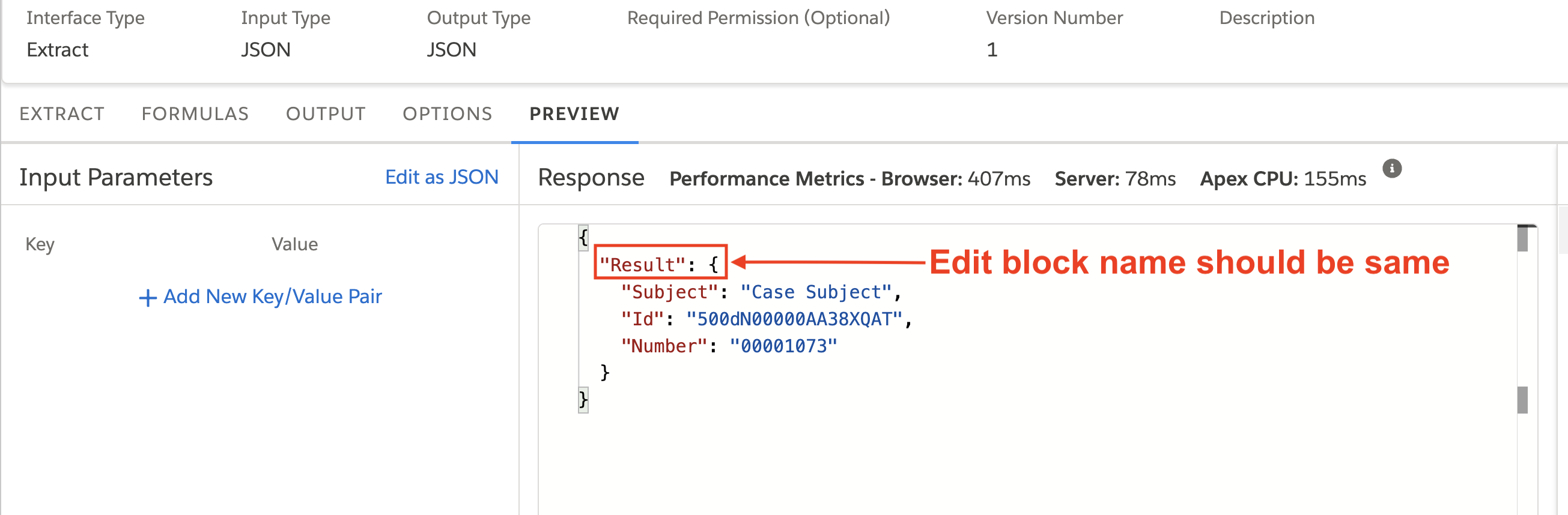
Knowledge-artikkelin numero
004464101
Ratkaisiko tämä artikkeli ongelmasi?
Anna palautetta, jotta voimme kehittyä!
