Select An Org
OmniScript Edit Block Considerations using Integration Procedure
Publish Date: Mar 3, 2025
Description
When binding data using an Edit Block in conjunction with an Integration Procedure that has a Data Mapper as the data source in OmniStudio, OmniScript Edit Block using Data Mapper Extract there are key considerations to ensure smooth data flow and proper integration. Refer the considerations below:
Resolution
1. Using the Data Mapper Node in Send/Response Transformations in the Response Action:
It’s essential to use the send JSON Path instead of the send JSON node in your Send/Response Transformation within the Response Action. This is because, when you use the Data Mapper, the binding will occur only through the parent node of the data source. For example, if your Data Mapper node is labeled "result," this label needs to match exactly in the preview of the Integration Procedure. This ensures that the data is correctly bound and mapped to the Edit Block in the integration preview. The key here is maintaining consistency in naming between the node in the Data Mapper and the corresponding reference in the Integration Procedure.

2. Using the Data Mapper Node in Additional Output Responses:
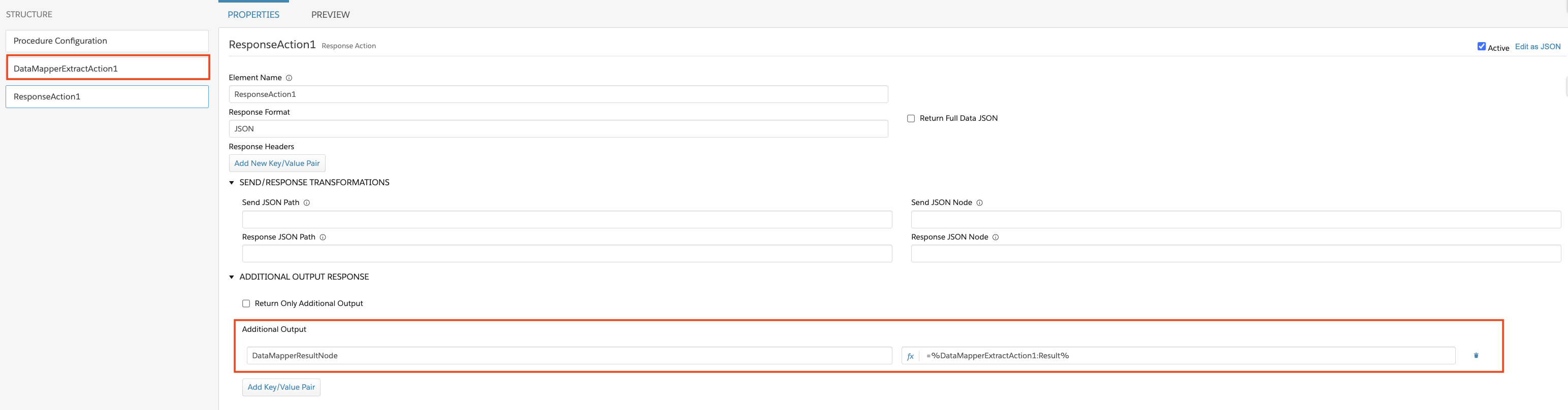
In the case where you need to include additional output from the Integration Procedure, ensure that the node you want to display in the preview matches the Data Mapper node name exactly. For instance, if the additional output node from the Data Mapper is named "DataMapperResultNode," this exact name must be used when configuring the Edit Block.
Additionally, in the Expression Editor for the Edit Block, make sure to reference the root node of the Data Mapper accurately. For example, if the Data Mapper's root node is labeled "Result," the expression should be written as =%DataMapperExtractAction1:Result%. This guarantees that the data from the correct parent node of the Data Mapper is pulled into the Edit Block, ensuring proper binding and display in the preview.
By following these best practices, you ensure that the data is correctly bound and displayed in OmniStudio, enabling smooth and accurate data integration.
Knowledge Article Number
004464507
Did this article solve your issue?
Let us know so we can improve!
