조직 선택
Extra line breaks are added to the rich text fields of Knowledge object when importing CSV by Dataloader v60 or higher
게시 일자: Apr 2, 2026
상세 설명
Extra line breaks are added to the rich text fields of Knowledge object when importing CSV by Dataloader v60 or higher.
In Dataloader v59, LF is converted to blank space. This behavior change leads to add the extra line breaks to the rich text fields because of the following reasons:
1) New Lightning Article Editor add spaces between <p> tag when adding line breaks in rich text field.
UI:
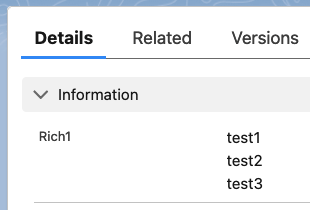
Data:
----
<p>test1</p> <p>test2</p> <p>test3</p>
----
2) When exporting this data by Dataloader (version is not related), spaces (20) are converted to LF (0A).
"<p>test1</p>
<p>test2</p>
<p>test3</p>"
3) And when importing this data by Dataloader v60 or higher, LF is converted to <BR> tag which leads to extra line breaks.
UI:
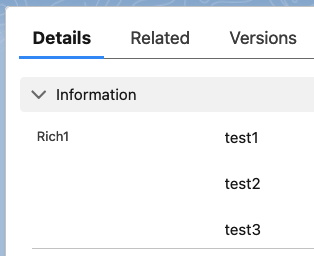
Data:
----
<p>test1</p><br><p>test2</p><br><p>test3</p>
----
솔루션
Dataloader contains a config property sfdc.load.preserveWhitespaceInRichText that causes the line breaks to be converted into BR tags.
"sfdc.load.preserveWhitespaceInRichText" is a read-only property that's set to true by default. So, if you set it to false in config.properties file (making sure that data loader is not running when you modify config.properties file), you will get intended behavior.
You upload two kinds of texts in RTF field:
- Text containing HTML formatting - in this case you explicitly want to control formatting. Setting "sfdc.load.preserveWhitespaceInRichText=false" supports this case.
- Text with tabs, line breaks, and such - in this case you hasn't explicitly specified formatting but preserve your whitespaces. Setting "sfdc.load.preserveWhitespaceInRichText=true" supports this case. It is the default setting.
Knowledge 기사 번호
004633920
이 기사를 통해 문제를 해결했습니까?
개선을 위한 의견을 보내주세요.
