Seleccionar una organización
Resolving 302 Redirects When Fetching Profile Photos via Salesforce Platform Named Credentials
Fecha de publicación: Apr 2, 2026
Descripción
Fetching profile picture in Salesforce can be done in many ways and one of the ways is to use Callout using Named Credentials and get the file as blob so that you can store it somewhere or pass it to other APIs.
Below is the sample code you can use to get the file but there is a problem with the below code as when you will make a callout to profilephoto/729bZ0334444Otd/T will give you 302 redirect status code and we generally refresh the token when receiving a 401 but as in this case we are getting 302 so the token will not be refreshed:
HttpRequest fetchRequest = new HttpRequest();
fetchRequest.setEndpoint('callout:SalesforceSelfEndpoint/' +'profilephoto/729bZ0334444Otd/T');
fetchRequest.setMethod('GET');
fetchRequest.setHeader('Accept', '*/*');

Http fetchHttp = new Http();
HttpResponse fetchResponse = fetchHttp.send(fetchRequest);

Blob fileContent = fetchResponse.getBodyAsBlob();
System.debug('Status: ' + fetchResponse.getStatusCode());
System.debug('Blob size: ' + (fileContent != null ? fileContent.size() : 0));
Solución
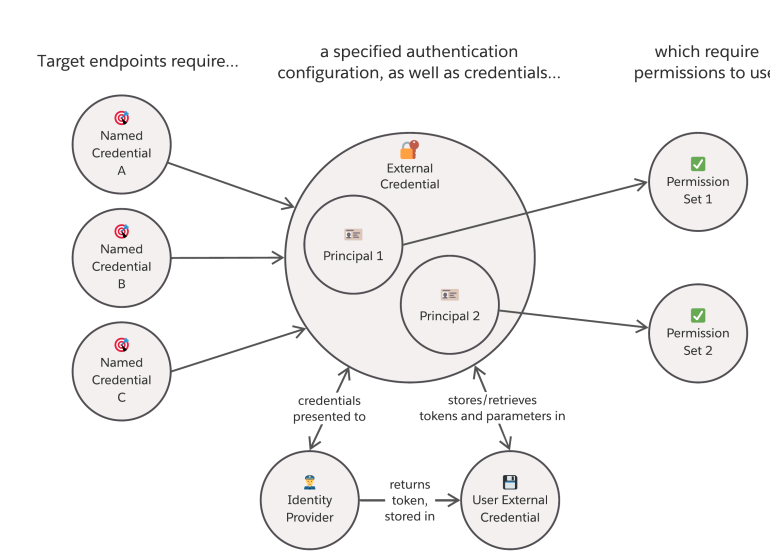
To resolve this issue, create an additional Named Credential that uses the same External Credential, then make a dummy call using the new Named Credential. This call will refresh the token and store it. Since both Named Credentials share the same External Credential, the original Named Credential that was returning the 302 code will now have the updated token. After this, when you make a callout to fetch the photo using the above code, it should work.
HttpRequest fetchRequest = new HttpRequest();
fetchRequest.setEndpoint('callout:Test200NamedCred/' + '/services/data/v56.0/actions/custom/flow/Dummy_Flow'');
fetchRequest.setMethod('POST');
fetchRequest.setHeader('Content-Type', 'application/json');
string body = '{ "inputs" : [ ] }';
fetchRequest.setBody(body);
Http fetchHttp = new Http();
HttpResponse fetchResponse = fetchHttp.send(fetchRequest);
Número del artículo de conocimiento
004634379
¿Resolvió este artículo su problema?
¡Háganos saber cómo podemos mejorar!
