Выбрать организацию
How to Compare the Values of a Single Measure Across Two Distinct Dynamic Time Periods Within the Same Worksheet
Дата публикации: Aug 6, 2025
Задача
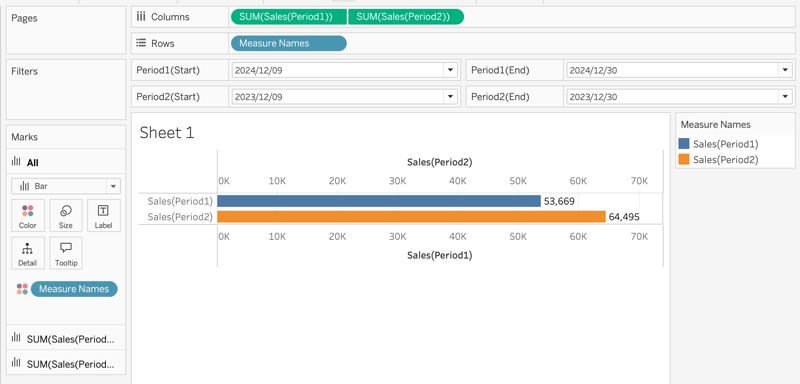
To compare the values of a single measure (e.g., [Sales]) across two distinct dynamic time periods (Period 1 and Period 2) within the same worksheet:
Действия
1. Create a Parameter: [Period1 (Start)]
This parameter will allow dynamic selection of the start date for Period 1.
-
Data Type: Date
-
Allowable Values: List
-
Source of Values: Select values from
[Order Date]
2. Create Additional Parameters
Repeat step 1 to create the following parameters for dynamic date selection:
-
[Period1 (End)] : this parameter is for the end date of Period 1
-
[Period2 (Start)] : this parameter is for the start date of Period 2
-
[Period2 (End)] : this parameter is for the end date of Period 2
3. Create a Calculated Field: [Sales (Period1)]
IF [Order Date] >= [Period1 (Start)] AND [Order Date] <= [Period1 (End)] THEN [Sales] END
4. Create a Calculated Field: [Sales (Period2)]
IF [Order Date] >= [Period2 (Start)] AND [Order Date] <= [Period2 (End)] THEN [Sales] END
5. Add Fields to the View
-
Drag [Sales (Period1)] and [Sales (Period2)] to the Columns shelf.
-
Right-click on
[Sales (Period2)]on the Column shelf and select Dual Axis. -
Then, right-click on one of the axes and choose Synchronize Axis to align both measures.
6. Show Parameter Controls
Display the following parameter controls to allow users to select custom date ranges:
(1)Select the start date and end date of Period 1 on the parameter below:
-
[Period1 (Start)]
-
[Period1 (End)]
(2)Select the start date and end date of Period 2 on the parameter below:
-
[Period2 (Start)]
-
[Period2 (End)]
Дополнительные ресурсы
Refer to the attached workbook. It contains the implemented resolution.
Additionally, the movie demonstrating this resolution's implementation is also attached.
Номер статьи базы знаний
004634394
Эта статья решила вашу проблему?
Оставьте свой отзыв, чтобы мы могли стать лучше!
