Seleziona un'organizzazione
Initiate the 'Recall' action from a stage other than the Approval Submission using Advanced Approvals.
Data pubblicazione: Apr 29, 2025
Descrizione
How can a user initiate the 'Recall' action in Advanced Approvals from a stage other than the Approval Submission?
Risoluzione
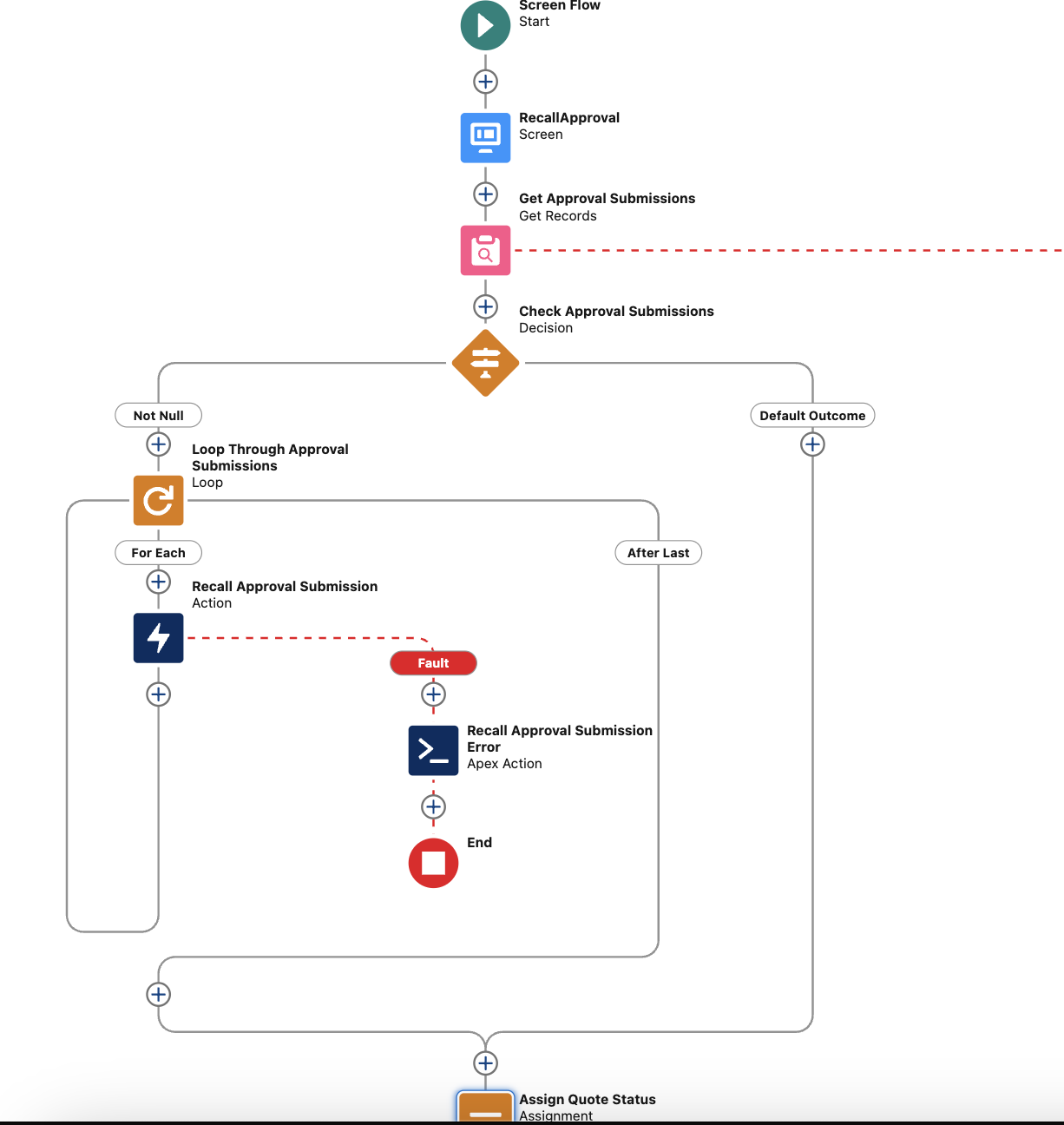
Created a Screen Flow with an appropriate title, following these steps to recall approval submissions and update the quote status:
-
Initial Screen: The flow begins with a screen displaying a "Recall" button for the user to initiate the action.
-
Retrieve Active Approvals: The flow retrieves all approval submissions related to the triggering quote that are still in progress.
-
Loop Through Submissions: The flow loops through the collection of active approval submissions.
-
Recall Action: For each approval submission, the flow calls the recall action to retract the approval.
-
Update Quote Status: Once the recall action is completed, the flow updates the status of the quote back to "Draft."
-
Confirmation Screen: Finally, the flow presents a confirmation screen to the user, indicating that the quote has been successfully recalled.
Numero articolo Knowledge
004693771
Questo articolo ha risolto il problema?
Facci sapere, così possiamo migliorare!
