Seleccionar una organización
Reconnecting the Quip/Salesforce Integration after a Sandbox Refresh
Fecha de publicación: Apr 30, 2025
Descripción
CREATE AND REPLACE YOUR API KEY
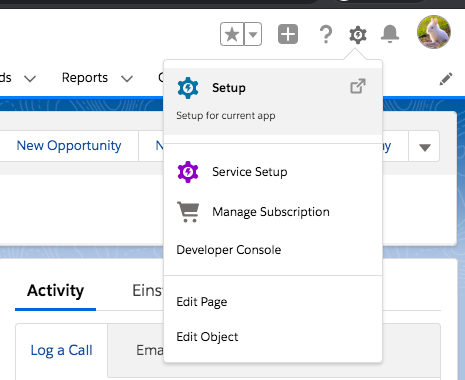
1. In Salesforce click the gear (upper right), then select “Setup.”
2. Search for Auth. Provider in the Quick Find
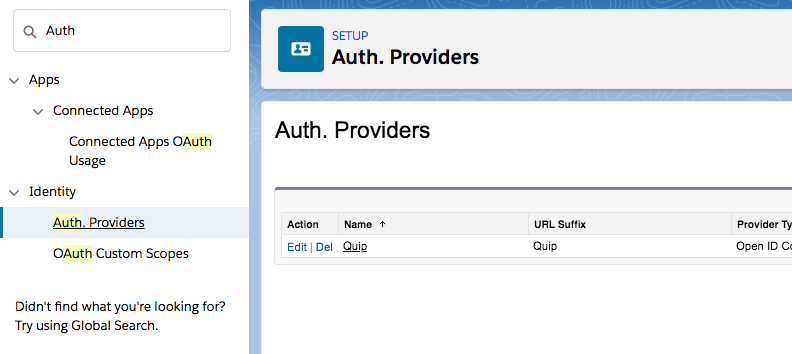
3. Search for Quip
4. Open the Quip Auth Provider and click Edit
5. Log into the Quip Admin Console (admin.quip.com)
6. Choose Settings > Integrations > Click on New API Key
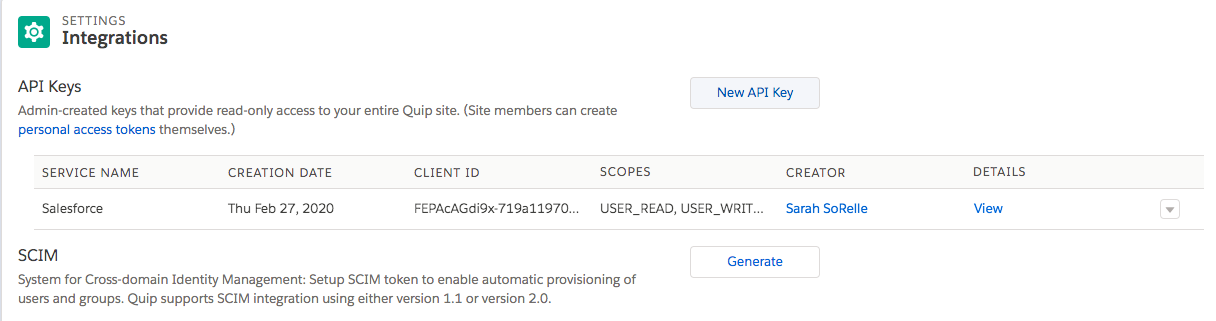
7. Create a new Salesforce API Key > check all boxes with the exception of TEAMS in the Scope (you may not see the TEAMS option in your view) > Generate the new key
8. Go back to your Quip Auth.Provider in Salesforce
9. Replace the Consumer Key and Consumer Secret with the new Client ID and Client Secret from your Quip Admin Console > Save
10. Follow the steps in this Document to reconnect the External Data Source for each user:
https://help.salesforce.com/s/articleView?id=000390263&type=1
Recursos adicionales
Quip Education Portal - https://quip.com/training
Quip Admin Learning Path - https://quip.com/training/work-anywhere-quip-admin-learning-path
Quip Implementation Hub - https://quip.com/training/salesforce-anywhere-and-quip-deployment-hub
Quip Documentation in help.salesforce.com - https://help.salesforce.com/s/articleView?id=xcloud.quip.htm&type=5
Número del artículo de conocimiento
004695446
¿Resolvió este artículo su problema?
¡Háganos saber cómo podemos mejorar!
