Select An Org
Salesforce Field Service Mobile App: Community Users See Web UI Instead of Mobile App Interface When Logging In
Publish Date: May 28, 2026
Description
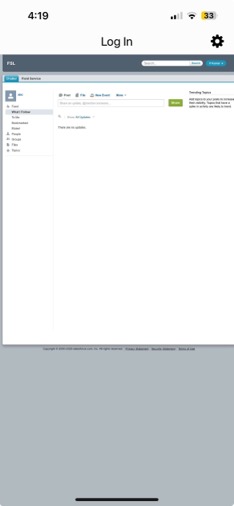
Community users of the Salesforce Field Service (SFS) Mobile App are seeing the Salesforce web browser UI instead of the native Field Service Mobile app interface after logging in. This issue occurs because users are selecting the "Use custom domain" login option, which redirects them to the web UI rather than launching the mobile app experience.
Screenshot showing a Community User seeing the web browser UI of Salesforce instead of the Field Service Mobile app interface after logging in via the "Use custom domain" option on the SFS Mobile App login screen.
Resolution
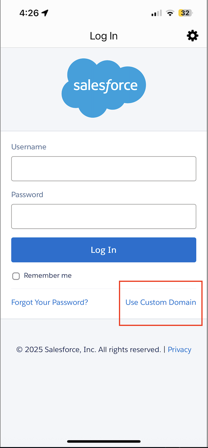
This issue occurs because Community Users are logging in using the "Use custom domain" option, which redirects them to the web UI instead of launching the native Salesforce Field Service Mobile app interface. The correct login method requires using the "Choose connection" option with the appropriate Experience Cloud site URL.
Screenshot showing the incorrect "Use custom domain" option selected on the Salesforce Field Service Mobile app login screen, which causes the web UI redirection issue.
Screenshot showing the incorrect "Use custom domain" option selected on the Salesforce Field Service Mobile app login screen, which causes the web UI redirection issue.
Resolution Steps
- Open the Salesforce Field Service Mobile app. On the login screen, select the "Choose connection" option instead of "Use custom domain."Screenshot showing the "Choose connection" option on the Salesforce Field Service Mobile app login screen — users should select this option instead of "Use custom domain."
- Enter the appropriate Experience Cloud site URL:
- For production environments: sitename.my.site.com
- For sandbox environments: sitename.sandbox.my.site.com
- Enter your username and password to complete the login.
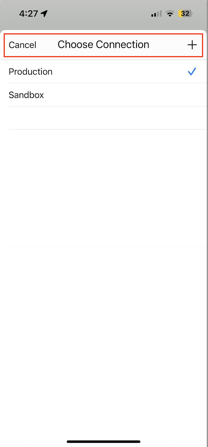
Using the "Choose connection" option with the correct Experience Cloud URL ensures Community Users are directed to the native Salesforce Field Service Mobile app interface, providing a consistent and optimized mobile experience.
Additional Resources
Knowledge Article Number
004695506
Did this article solve your issue?
Let us know so we can improve!
